
Fieldworker GPS Tracking & Live Job Status Updates
Fieldworker GPS Tracking helps office teams, dispatchers, and customers follow the progress of an assigned fieldworker after they begin travelling to a job. Once the fieldworker taps On The Way in the OctopusPro mobile app, the system can start GPS tracking for that specific visit, calculate ETA, display live job progress, and record a clear status history through arrival, start, completion, and optional auto check-out.

This feature is designed for booking-level travel and job progress tracking. It is ideal when a job has already been assigned and you want visibility over that appointment from departure to completion. It helps reduce uncertainty, improve ETA accuracy, keep customers informed, validate on-site attendance, and give office staff a reliable audit trail of movement and status changes.
OctopusPro also offers two related location-based tools that serve different purposes: Nearby Bookings proximity-based scheduling for optimising jobs around a booking, and Real-Time Field Worker Tracking software for seeing where active fieldworkers are right now during the workday. This page explains how booking-level GPS tracking works and how it fits alongside those other dispatch and scheduling features.
How OctopusPro uses location for scheduling, dispatch, and job tracking
OctopusPro uses location in different ways at different stages of the scheduling and service workflow. Although several features involve GPS, distance, maps, or nearby job matching, they do not all work the same way, and they do not all serve the same purpose.
The easiest way to understand the difference is to think of them as three separate location workflows:
- distance-based scheduling and matching when choosing the best fieldworker for a job
- real-time live fieldworker tracking when dispatch needs to know where active fieldworkers are right now
- booking-level GPS tracking and ETA when a fieldworker has already been assigned and is travelling to or working on a specific job
In day-to-day scheduling, OctopusPro can compare the booking address with each fieldworker’s base or home location to help rank and match workers by distance. This is one of the standard ways the system supports scheduling decisions.
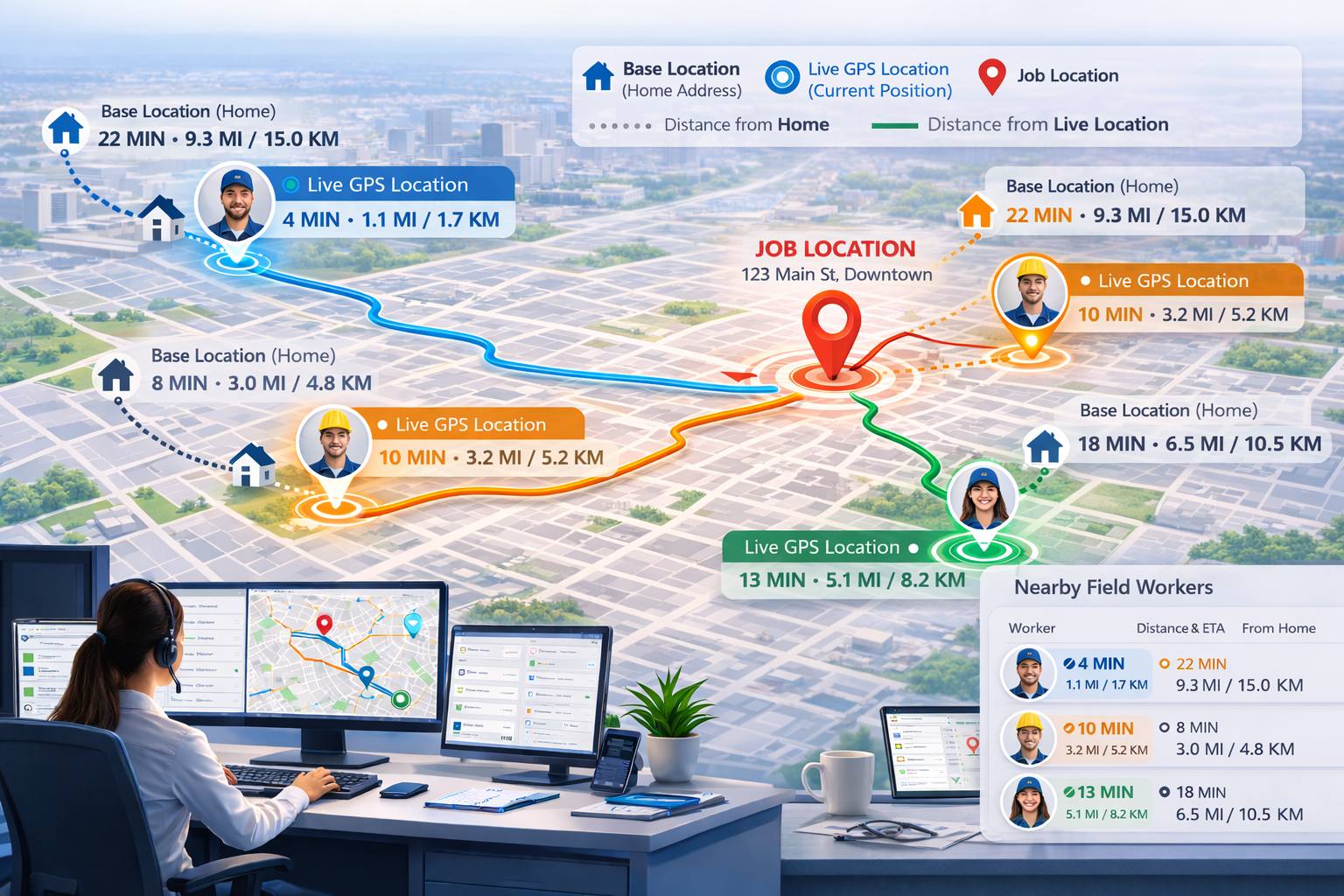
When Real-Time Field Worker Tracking software is enabled and a fieldworker is online, dispatch can also compare the booking address with that worker’s current live GPS location. This gives office staff two useful points of reference:
- how far the worker is based from the job
- how far the worker is from the job right now
This is important because the fieldworker who is closest on paper is not always the fieldworker who is closest in practice. A technician may be based far away, but already working nearby and therefore able to reach the next job much sooner.

Quick navigation
- How OctopusPro uses location for scheduling, dispatch, and job tracking
- What is fieldworker GPS tracking?
- Key benefits
- Prerequisites
- How GPS tracking and job statuses work
- What the visit map can show
- Geofencing and arrival validation
- How to enable and configure it
- Where you can view tracking
- Notifications and customer messages
- Privacy, permissions, and address masking
- Understanding the three location workflows
- What each feature changes in scheduling
- Similarities and key differences
- How this differs from other location features
- When to use each feature
- Which businesses benefit most from each feature?
- Industry use cases
- How to enable and use them
- Best practices
- FAQs
- Related guides
What is fieldworker GPS tracking?
Fieldworker GPS Tracking is a visit-specific tracking workflow that begins when the assigned fieldworker starts travelling to a booking. It allows OctopusPro to show travel progress, ETA, key appointment status milestones, and location updates related to that specific visit.
Unlike workforce-level live tracking, this feature is tied to one booking or appointment. It is used after the job has already been assigned and is best suited to monitoring the progress of that visit from departure to completion.
This makes it especially useful for businesses that want to:
- show when a fieldworker is on the way
- track ETA and travel progress to site
- record arrival, start, and finish milestones
- validate site attendance with geofencing
- reduce inbound calls from customers asking where the technician is
- maintain a stronger operational audit trail for each visit
Key benefits
- Improved ETA visibility: See when the fieldworker is travelling and follow progress toward the job site.
- Better customer communication: Keep customers informed with On The Way updates, ETA-related notifications, and tracking visibility when enabled.
- Clear visit audit trail: Record status changes such as On The Way, Arrived, Started, Running Late, and Finished with timestamps.
- Geofence-based validation: Restrict arrival actions to the correct location and optionally automate check-out when the worker leaves the site.
- Stronger operational oversight: Give office teams better visibility into field progress for service delivery, escalations, and support.
- Reduced missed or forgotten check-outs: Use optional geofence-driven auto check-out to improve timesheet quality and booking history accuracy.
Prerequisites
To use GPS tracking effectively:
- Location permission must be granted on the fieldworker’s device.
- GPS must be enabled on the device.
- GPS / Tracking must be enabled in your Booking Settings.
- Fieldworkers should follow the app workflow consistently, such as On The Way → Arrived → Started → Finished, so the visit map and timestamps are captured correctly.
If the tracking workflow is not enabled, or if device permissions are blocked, the visit map and status-based ETA flow may not behave as expected.
How GPS tracking and job statuses work
OctopusPro combines GPS tracking, job status updates, and ETA monitoring so office users and, if enabled, customers can follow job progress from departure through completion.
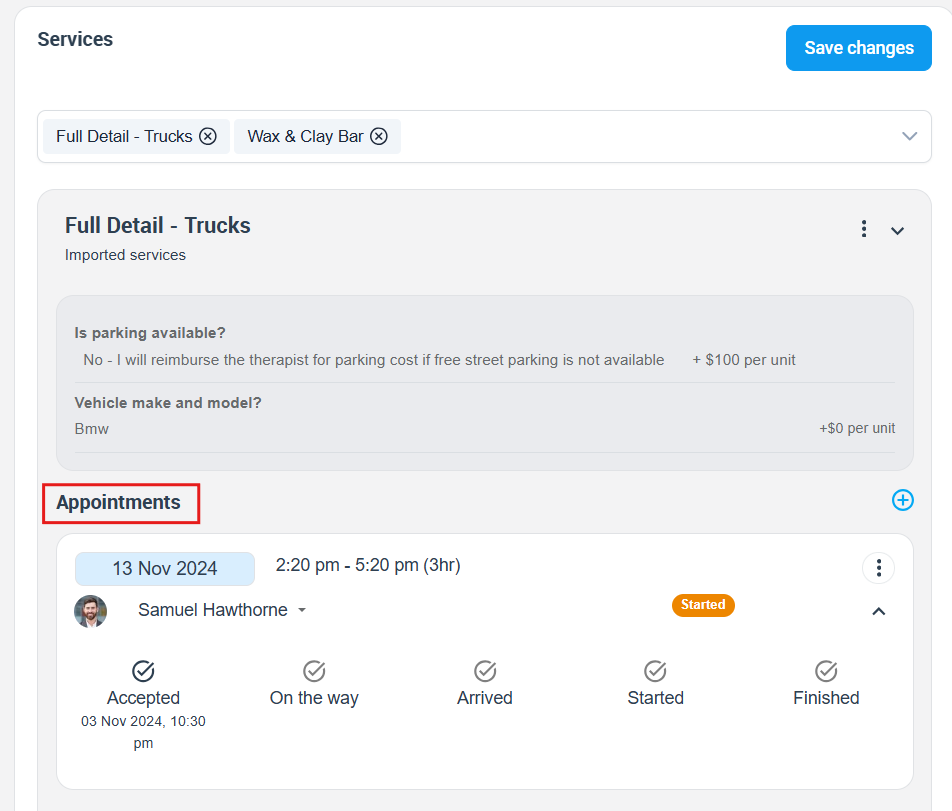
The typical status flow is:
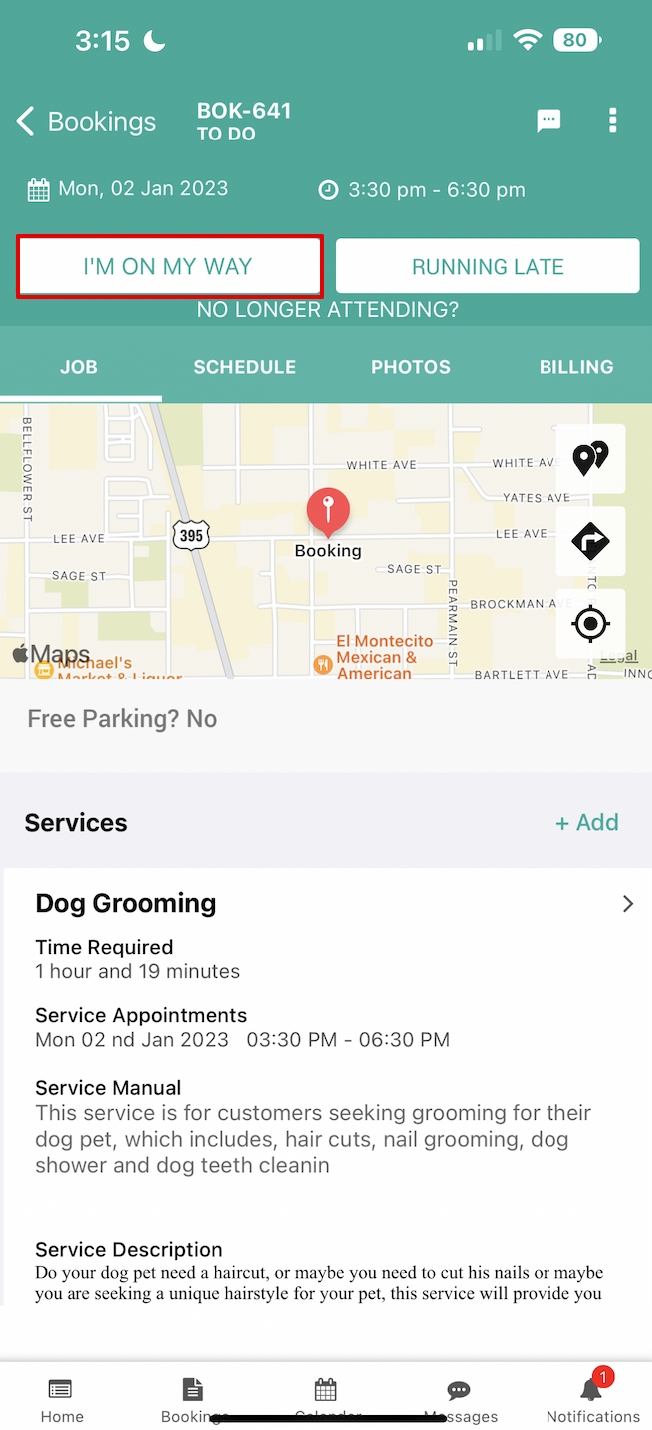
- On The Way: The fieldworker taps On The Way in the app. GPS tracking for that visit starts and ETA is calculated or updated.
- Arrived / Check-In: The fieldworker reaches the site and confirms arrival.
- Started: The job start time is recorded.
- Finished / Check-Out: The job finish time is recorded and booking-level tracking stops for that visit.
- Auto Check-Out (optional): If enabled, the system can automatically check the fieldworker out when they leave the geofence. If they return, the app can prompt them to check in again.
This workflow is particularly valuable because it turns location activity into a clear service timeline that can be reviewed later by office staff and, depending on your settings, by customers as well.


What the visit map can show
The booking tracking map can show more than just a pin on a map. Depending on your settings and permissions, it can display:
- live location markers during travel and on-site activity
- the visit status timeline, such as On The Way → Arrived → Started → Finished
- exact timestamps for each status change
- historical movement markers recorded for that visit
- distance travelled while en route, where applicable
- progress details for each appointment in a multi-appointment booking
This is one of the key differences between booking-level GPS tracking and general workforce tracking. The map is built around one assigned visit and its full service timeline, not just a worker’s current location in isolation.
Geofencing and arrival validation
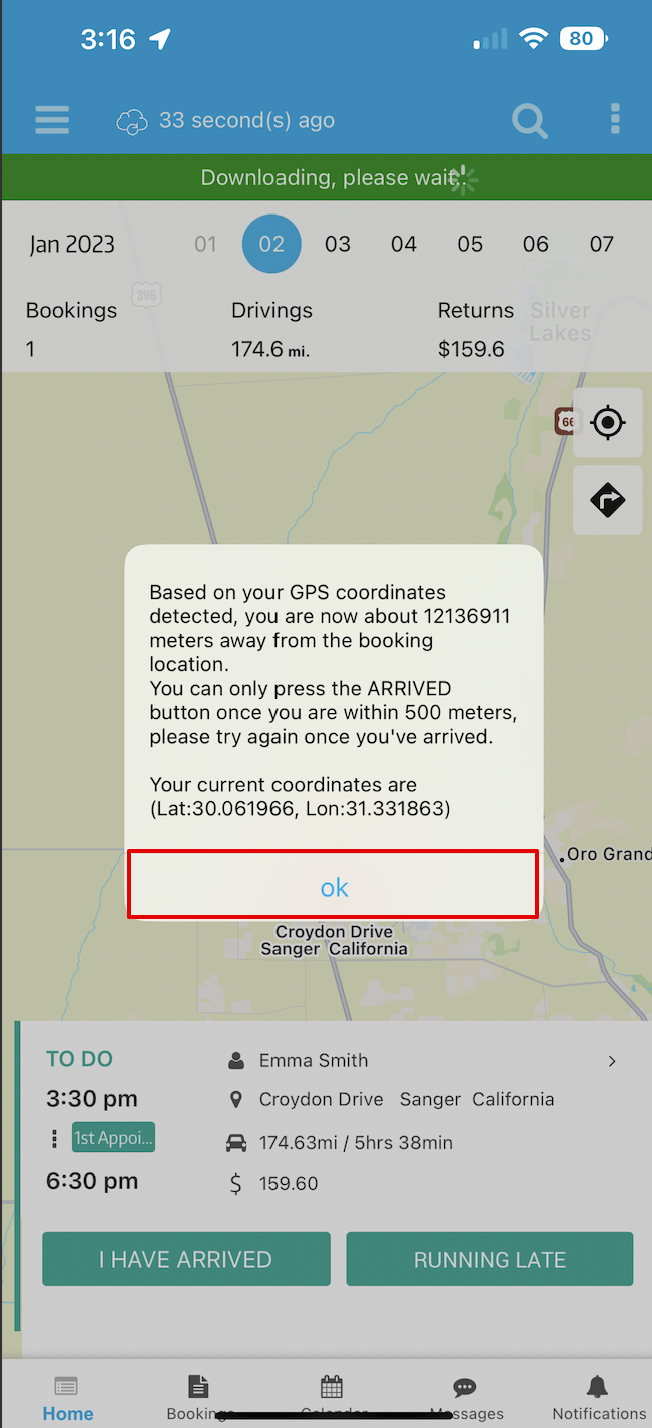
OctopusPro uses a geofence, which is a virtual radius around the job site, to support site validation and automation. A common default is 500 metres, although the radius can be adjusted to suit the type of job, site size, and GPS conditions.
Geofencing can be used to:
- restrict the Arrived action so it only works when the device is inside the defined radius
- use Entered Zone and Left Zone events to monitor arrivals and departures
- automatically check out a fieldworker when their device leaves the zone, if auto check-out is enabled
This is especially useful for contractors, home services, mobile teams, and businesses that want stronger location-based attendance validation.
How to enable and configure it
Go to:
Admin Portal → Settings → General Settings → Booking Settings
Recommended setup:
- Enable GPS / Tracking.
- Enable the booking tracking workflow so GPS, ETA prompts, and visit status flow are active.
- Configure optional controls such as:
- geofence radius
- late-arrival thresholds or Running Late rules
- address masking rules
- tracking-related SMS or email templates for events like On The Way and Running Late
- auto check-out via geofence
Fieldworkers must also allow location access and keep GPS enabled on their device for tracking to work reliably.
Where you can view tracking
1. Booking Details page (Admin / Office)
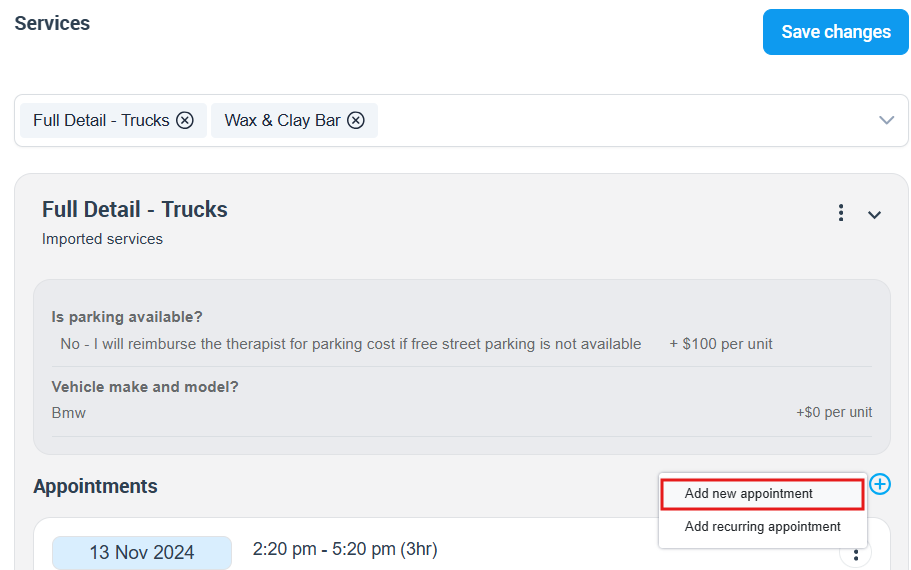
Office users can open a booking and view the fieldworker tracking map from the Scheduled Appointments area. This is the main place to monitor the live route, movement markers, timestamps, and status progression for that booking.
If the booking includes multiple appointments or visits, you can use the appointment controls to view tracking for each visit individually.
This view is especially useful for dispatchers, office staff, and service managers who need to monitor progress and respond quickly if the fieldworker is delayed or the booking needs attention.
2. Customer Portal
If customer tracking is enabled for your business, customers can view important progress details in the customer portal. This can reduce uncertainty and cut down on “Where is my technician?” calls.
Depending on your configuration, customers may be able to see:
- the fieldworker’s current status
- ETA and On The Way progress
- time-stamped updates such as Started and Finished
- the fieldworker’s location while en route
- expanded movement and status details using an Add more style option

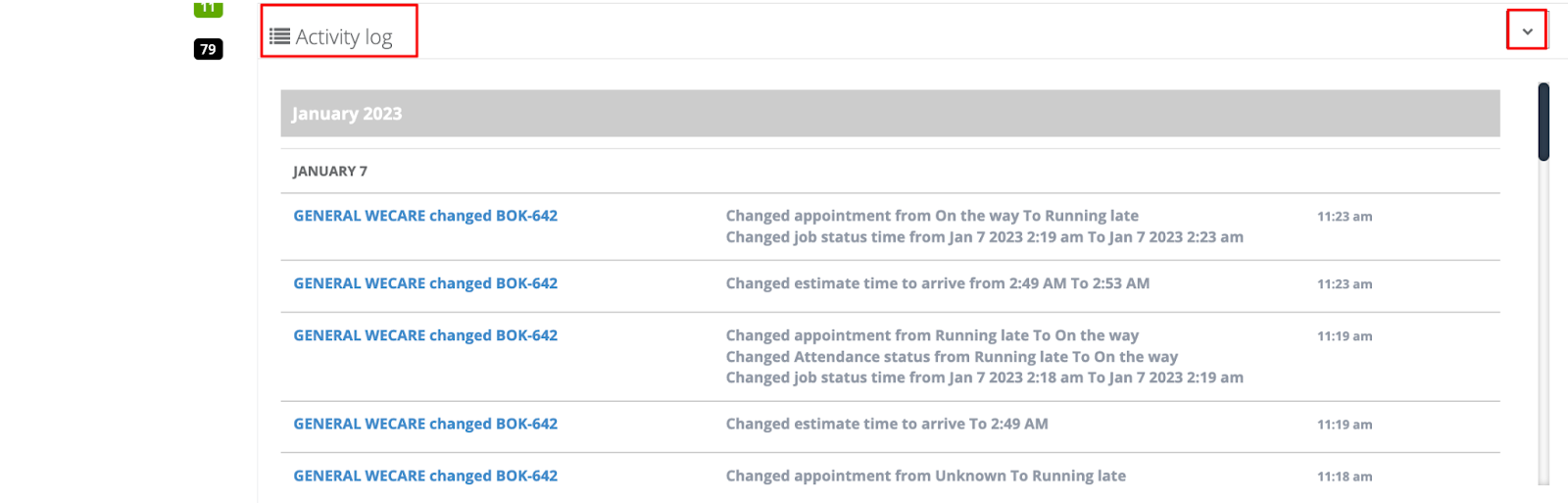
3. Fieldworker Activity Log
Admins can also review tracking and status history from the fieldworker’s profile under Activity Log. This provides a useful audit trail of updates such as On The Way, Running Late, and other recorded status changes.
Notifications and customer messages
OctopusPro can notify office users and, if enabled in your workflow, customers when important tracking events occur, such as when a fieldworker is On The Way or Running Late.
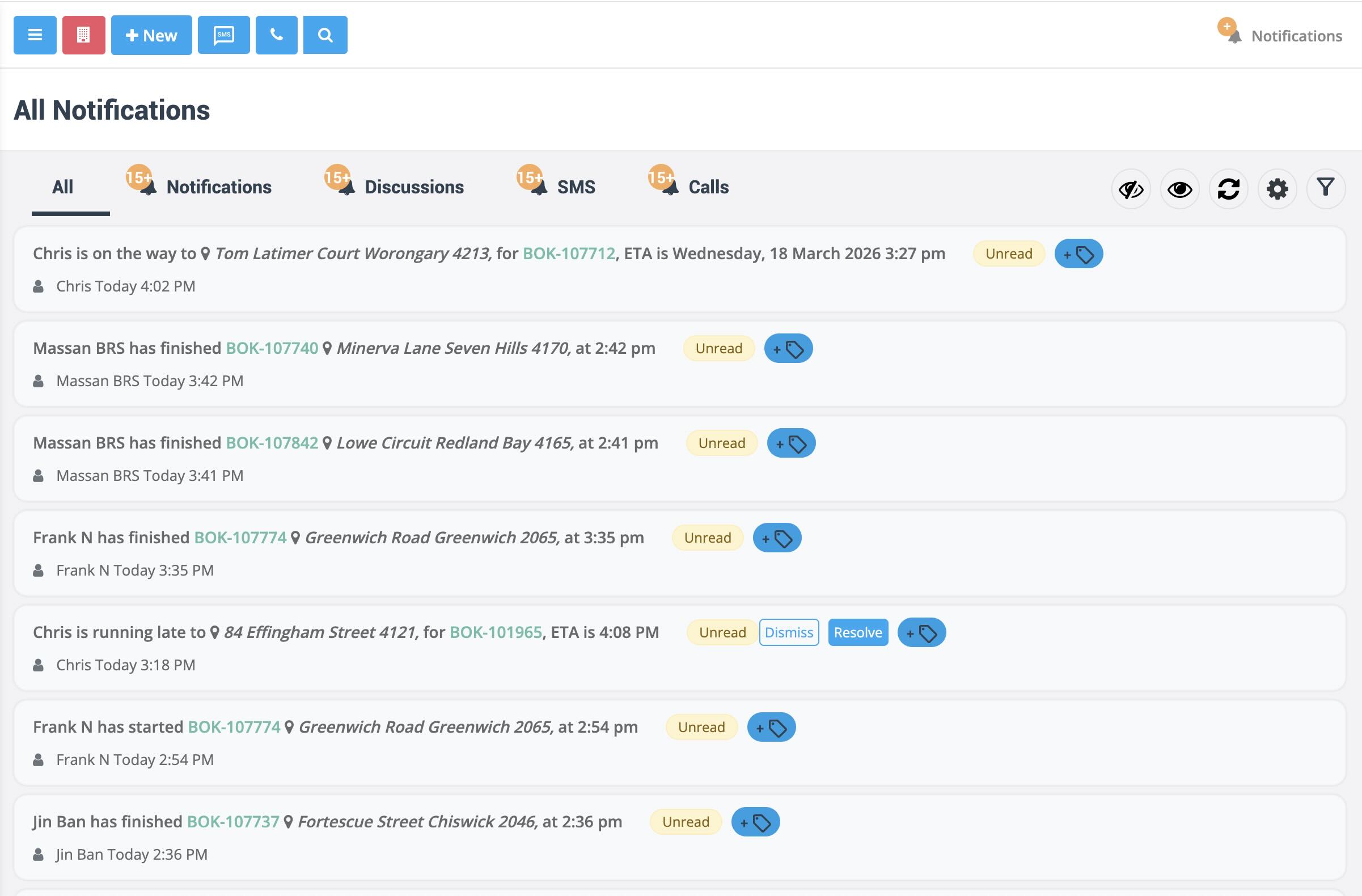
For example, when a fieldworker taps On The Way, the app can prompt them to send an SMS update to the customer. Depending on your settings, that message can include ETA details and a tracking link.
This is especially useful for home services, maintenance, repairs, cleaning, and any industry where customers expect greater visibility before arrival.
Privacy, permissions, and address masking
GPS tracking is permission-based and designed for operational visibility, ETA management, attendance validation, and job progress monitoring.
- Visibility controls: Admin and office users can view tracking maps, while customers only see tracking if you allow it.
- Address masking: If you want to limit what fieldworkers see until they are actively travelling, you can use address masking rules.
- Fieldworker permissions: You can control whether fieldworkers always see the full booking address and which tracking or communication prompts appear in their workflow.
This helps businesses balance operational oversight with privacy and controlled information access.
Understanding the three location workflows
OctopusPro includes multiple intersecting location features because dispatching, scheduling, travel tracking, and on-site job progress are not the same thing.
Two of these features use live GPS location, but the trigger rules and business purpose are different:
- Booking-Tracking Workflow (GPS + ETA) starts when the assigned fieldworker taps On The Way and normally continues until the fieldworker checks out of that specific job.
- Real-Time Field Worker Tracking software tracks fieldworkers while they are online in the mobile app, whether they are on the way to a job, working on site, between jobs, or not currently assigned to a booking.
OctopusPro also includes Nearby Bookings proximity-based scheduling, which supports scheduling decisions in a different way. It is not based on a fieldworker’s live GPS position throughout the day. Instead, it helps you look at future or upcoming bookings already scheduled near the job you are creating, reviewing, or assigning.

What each feature changes in scheduling
These features affect scheduling at different points in the workflow.
Standard distance-based scheduling helps the system compare the booking address with each fieldworker’s home or base address. This helps identify which workers are suitable and nearby based on where they are normally located or operate.
Real-Time Field Worker Tracking software adds another dispatch layer by comparing the booking address with the fieldworker’s current live GPS location, as long as the worker is online or otherwise actively tracked in the app. This means dispatch can see both:
- distance from the fieldworker’s home or base location
- distance from the fieldworker’s current live location
This gives dispatchers a more realistic view of who can actually get to the job first.
Nearby Bookings proximity-based scheduling improves scheduling from a different angle. Instead of focusing on where the fieldworker is right now, it shows what work is already scheduled near the job location, helping you group jobs, reduce unnecessary travel, and choose a better schedule gap or route.
Booking-Tracking Workflow (GPS + ETA) does not decide who should get the job. Instead, it becomes useful after assignment, when you need visibility into the trip, arrival, progress, and completion of that visit.
Similarities and key differences
All three features are related to location, maps, distance, and scheduling efficiency, but they are not interchangeable.
- All three can reduce travel time, but they do so at different stages of the workflow.
- Booking-Tracking Workflow (GPS + ETA) and Real-Time Field Worker Tracking both use live GPS location, but one is booking-specific and the other is worker-specific.
- Nearby Bookings supports smarter scheduling and route planning, but it is not a live fieldworker location tracking feature.
- Booking-Tracking Workflow (GPS + ETA) can be useful for both admins and customers, while Real-Time Field Worker Tracking is mainly an internal dispatch and scheduling tool.
- Nearby Bookings is mainly used by admins, schedulers, and fieldworkers planning future or upcoming work, rather than for customer-facing progress tracking.
How this differs from other location features
OctopusPro includes several location-aware tools, and they work best when each one is used for the correct stage of the workflow.
Fieldworker GPS Tracking & Live Job Status Updates
This page covers booking-level tracking. It begins after a job is assigned and the fieldworker taps On The Way. Its purpose is to track that visit, show ETA, record job milestones, support geofence-based arrival validation, and provide customer and admin visibility for that specific appointment.
Real-Time Field Worker Tracking Feature
Real-Time Field Worker Tracking is a worker-first live dispatch tool. It uses background location updates from the mobile app while a fieldworker is logged on, including while they are busy on a job, to help dispatchers see who is physically closest right now. It is best for urgent work, same-day service, fast dispatch decisions, and choosing the best fieldworker before the next job is assigned.
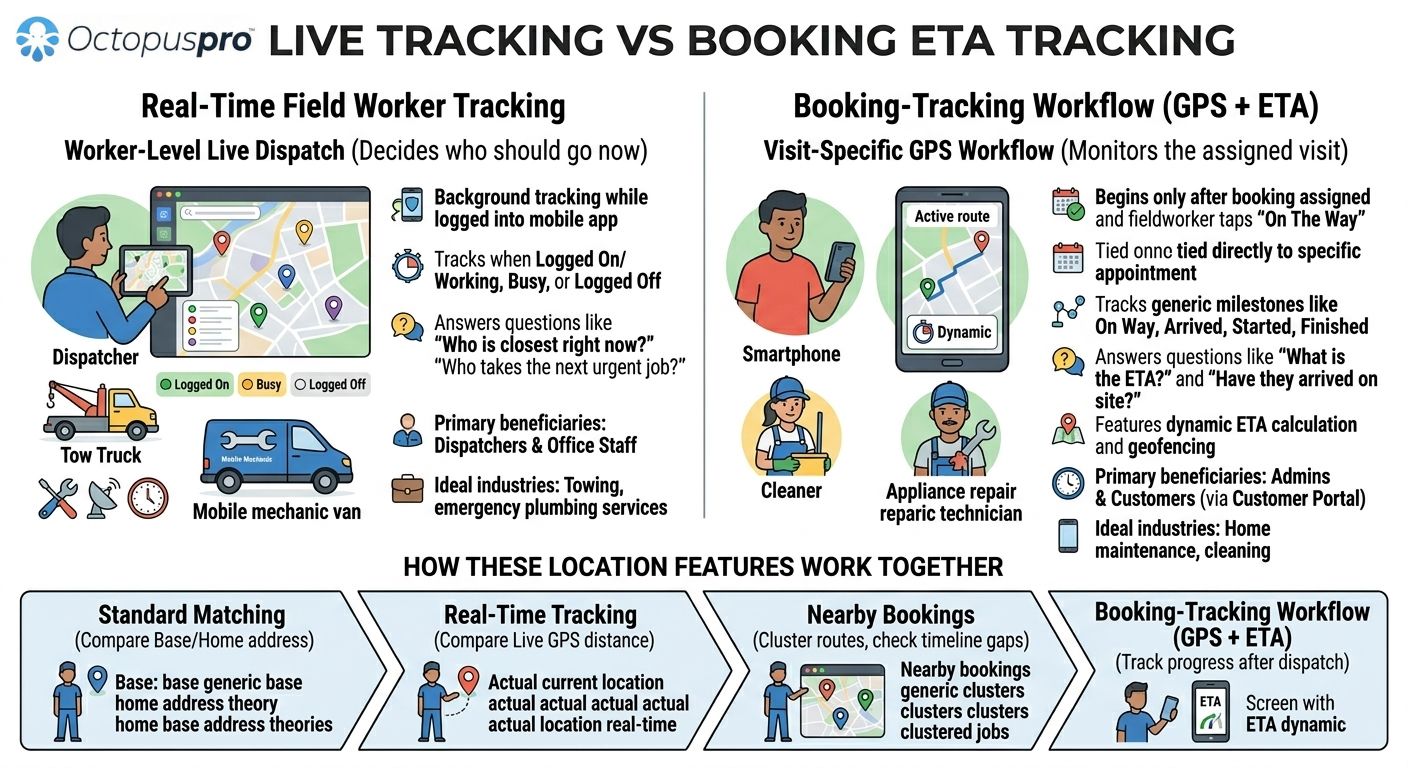
In simple terms, Real-Time Field Worker Tracking helps you answer: “Which fieldworker is closest right now?”
Nearby Bookings proximity-based scheduling
Nearby Bookings is a booking-first scheduling tool. It starts from a booking or quote and helps you see nearby jobs on an interactive map, in a road-distance-sorted list, and in a fieldworker timeline. It is best for clustering jobs, comparing available and qualified fieldworkers, reducing travel time, and confirming the best schedule gap around that booking.

In simple terms, Nearby Bookings helps you answer: “What other jobs are near this appointment, and how should I schedule around it?”
How the three features fit together
- Standard scheduling distance logic helps compare the job address with fieldworker base or home addresses.
- Real-Time Field Worker Tracking software helps you identify the best active fieldworker to send next based on current live location.
- Nearby Bookings proximity-based scheduling helps you organise work around a booking and optimise future routing.
- Fieldworker GPS Tracking & Live Job Status Updates helps you follow the assigned fieldworker once they are travelling to the job and working on site.
Together, these features support the full location-based workflow from scheduling and dispatch, to ETA and job progress, to completion and attendance validation.
When to use each feature
- Use Fieldworker GPS Tracking when the booking is already assigned and you want to monitor the trip, ETA, and progress of that visit.
- Use Real-Time Field Worker Tracking when you need to see live worker locations during the workday and compare current live distance as part of dispatch decisions.
- Use Nearby Bookings when you want to optimise the schedule around a booking, compare nearby scheduled jobs, and reduce route inefficiency.
Which businesses benefit most from each feature?
Real-Time Field Worker Tracking is most valuable for businesses that need rapid dispatch decisions based on current fieldworker location, such as towing, roadside assistance, locksmith services, emergency plumbing, urgent electrical work, mobile repairs, reactive maintenance, and any business handling last-minute callouts.
Nearby Bookings is especially valuable for businesses that manage scheduled rounds, route efficiency, or clustered appointments, such as cleaning, pest control, facilities management, property services, HVAC maintenance, inspections, courier work, and recurring home or commercial services.
Booking-Tracking Workflow (GPS + ETA) is especially useful for customer-facing service visits where ETA visibility, arrival validation, and progress updates matter, such as home maintenance, field repairs, cleaning, restoration, appliance repair, trades, and appointment-based on-site services.
Industry use cases
Plumbing, electrical, and HVAC
Use Fieldworker GPS Tracking to send On The Way updates, improve ETA visibility, and validate arrival at the service address. Use Nearby Bookings to cluster scheduled maintenance jobs. Use Real-Time Field Worker Tracking to dispatch the nearest technician to emergency callouts and compare distance from both base location and current location.
Cleaning and restoration
Use booking-level GPS tracking to monitor arrival and service progress for customer-facing appointments. Use Nearby Bookings to group jobs in the same suburb, street, or building. Use Real-Time Field Worker Tracking to see which logged-on team is closest when a same-day request comes in.
Locksmith, towing, roadside assistance, and mobile repair
Real-Time Field Worker Tracking is ideal for choosing the nearest active worker. Once assigned, Fieldworker GPS Tracking provides ETA, route visibility, and service progress for that specific visit. Nearby Bookings is useful when scheduling future work near existing appointments rather than dispatching the next urgent callout.
Facilities management and property services
Use Nearby Bookings to fit additional work into existing routes across multiple sites. Use booking-level GPS tracking to monitor each visit and maintain a stronger service audit trail. Use Real-Time Field Worker Tracking when a manager needs to know which active operative is closest to a reactive task right now.
How to enable and use them
Booking-Tracking Workflow (GPS + ETA) is controlled through your booking tracking setup. To use it properly, GPS / Tracking must be enabled in your Booking Settings, fieldworkers must allow device location access, and they must follow the status flow consistently in the app.
Real-Time Field Worker Tracking software requires fieldworkers to be logged in to the mobile app with location services enabled. To get useful dispatch results, you should also keep fieldworker services, working hours, service areas, and availability accurate, because live location improves dispatching but does not replace normal matching rules.
Nearby Bookings proximity-based scheduling is used from scheduling workflows such as bookings and quotes, where users can open the map, list, and timeline views to compare nearby work, road distance, schedule gaps, and qualified fieldworkers before assigning or reassigning jobs.
For related setup and usage details, see:
- Fieldworker GPS Tracking & Live Job Status Updates
- Real-Time Field Worker Tracking software
- Nearby Bookings proximity-based scheduling
- Fieldworker Availability Finder
- Fieldworker Service Areas & Locations
- Fieldworker Check-In/Out Tracking & GPS Time Logs
Best practices
- Make sure location permission is enabled on the fieldworker’s device and GPS is turned on.
- Use a geofence radius that suits the type of site you service. Increase it for large sites, high-rise buildings, or areas with weak GPS reception.
- Train fieldworkers to follow the full workflow consistently: On The Way → Arrived → Started → Finished.
- Encourage fieldworkers to tap Finish Job as the main completion step, even if auto check-out is enabled, so the end of the visit is recorded clearly and promptly.
- Use customer notifications thoughtfully so customers receive useful updates without unnecessary noise.
- Use Fieldworker Check-In/Out Tracking & GPS Time Logs alongside this feature if you want stronger attendance, payroll, and timesheet records.
- Use Nearby Bookings and Real-Time Field Worker Tracking alongside this feature rather than as replacements for it. Each tool supports a different stage of the dispatch workflow.
FAQs
When does Fieldworker GPS Tracking start?
It typically starts when the assigned fieldworker taps On The Way in the mobile app for that specific booking.
When does booking-level tracking stop?
Tracking for the booking normally ends when the fieldworker finishes the job and checks out, or when optional geofence-based auto check-out is triggered.
Does Real-Time Field Worker Tracking start only when the fieldworker is on the way?
No. Real-Time Field Worker Tracking is a separate feature. It can track fieldworkers while they are online in the app, whether they are on the way to a job, working on site, between jobs, or currently unassigned, depending on your configuration and workflow.
Does Nearby Bookings use live fieldworker GPS location?
No. Nearby Bookings helps with scheduling around a booking based on nearby scheduled jobs, road distance, map views, and fieldworker timelines. It is not the same as live fieldworker GPS tracking throughout the day.
Can I restrict arrival so workers must be near the site?
Yes. Geofencing can be used to restrict the Arrived action so it only works when the device is inside the defined radius.
Can customers view tracking?
Yes, if customer-facing tracking is enabled in your setup. Customers can see relevant progress information in the customer portal.
Can I track multiple visits within one booking?
Yes. If a booking has multiple appointments or visits, tracking can be reviewed per appointment from the booking details area.
Is this the same as Real-Time Field Worker Tracking?
No. Fieldworker GPS Tracking is tied to an assigned booking and tracks that visit after the fieldworker starts travelling. Real-Time Field Worker Tracking is used earlier in the workflow to see which active fieldworker is closest right now.
Is this the same as Nearby Bookings?
No. Nearby Bookings is used to compare and organise jobs around a booking using map, list, and timeline views. Fieldworker GPS Tracking is used after assignment to monitor travel and job progress for the selected visit.
Related guides
- Real-Time Field Worker Tracking software
- Nearby Bookings proximity-based scheduling
- Fieldworker Check-In/Out Tracking & GPS Time Logs
- Fieldworker Permissions & Access Control
- Booking Settings, Flags and Permissions
- Fieldworker Availability Finder
- Fieldworker Service Areas & Locations
Fieldworker GPS Tracking & Live Job Status Updates gives you booking-level visibility after a fieldworker has been assigned and starts travelling to the job. It works best alongside Nearby Bookings for schedule optimisation and Real-Time Field Worker Tracking for live dispatch visibility, helping you manage the full workflow from planning and dispatch to arrival, progress, and completion.
To stay updated, please subscribe to our YouTube channel.