
Real-Time Field Worker Location Tracking
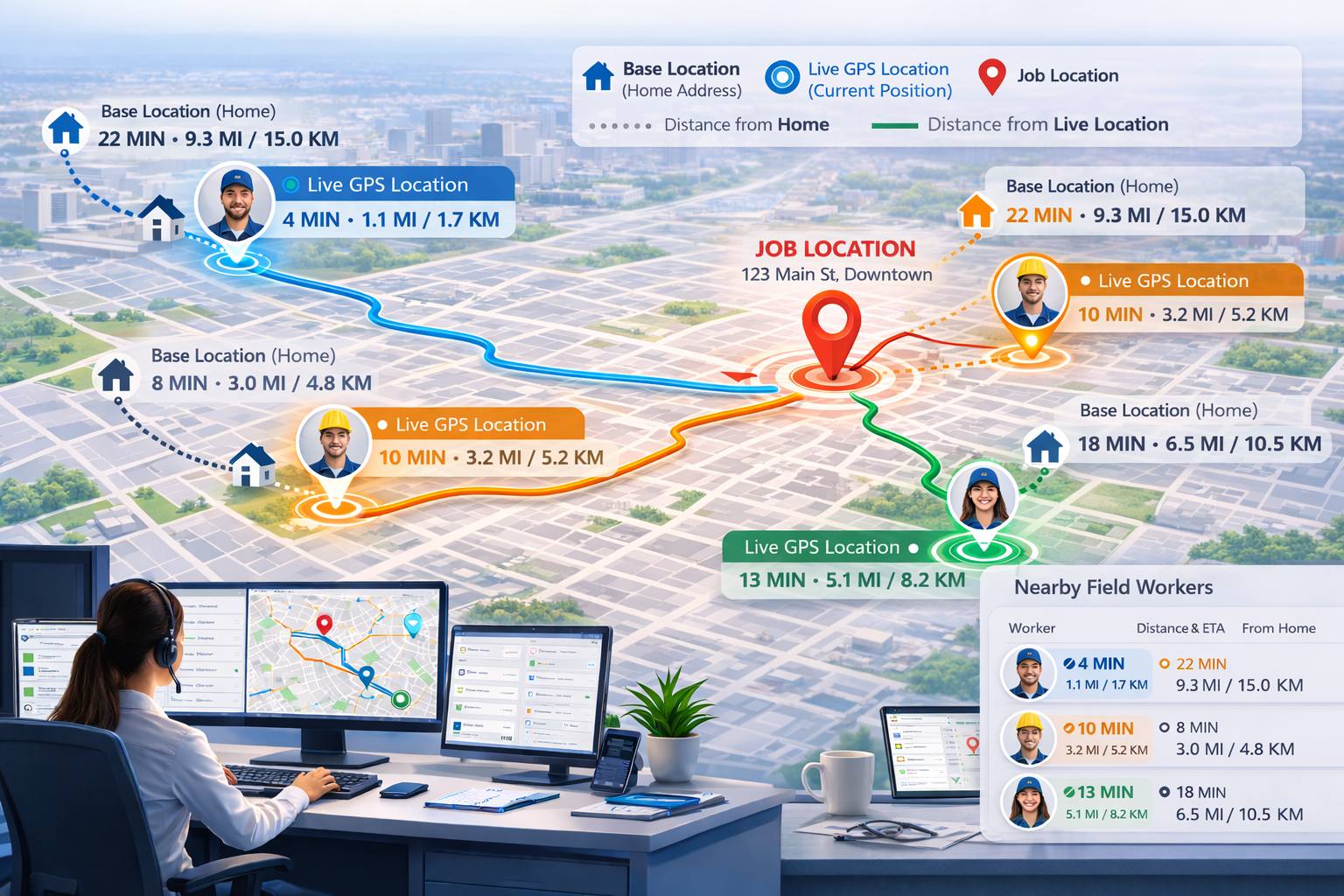
Real-Time Field Worker Location Tracking helps dispatchers and office staff see where active fieldworkers are during the workday, so they can assign jobs faster, reduce unnecessary travel, and make smarter scheduling decisions. Instead of relying only on a fieldworker’s home address, roster, or last assigned suburb, you can view their current live GPS location on a map and identify who is best positioned for the next job.
This feature is especially valuable for urgent callouts, same-day bookings, route-based scheduling, and businesses covering large service areas. It gives your dispatch team live workforce visibility, helping them respond faster and use nearby workers more efficiently without relying on manual calls, guesswork, or outdated assumptions.

How OctopusPro uses location for scheduling, dispatch, and job tracking
OctopusPro uses location in different ways at different stages of the workflow. Although several features involve GPS, maps, distance, or nearby job matching, they do not all work the same way, and they do not all serve the same purpose.
The easiest way to understand the difference is to think of them as four separate location workflows:
- standard distance-based scheduling and matching based on the booking address and the fieldworker’s home or base address
- Real-Time Field Worker Tracking based on the fieldworker’s current live GPS location while they are online
- Booking-Tracking Workflow (GPS + ETA) based on a specific assigned visit after the fieldworker taps On The Way
- Nearby Bookings proximity-based scheduling based on other future or upcoming bookings already scheduled near the job location
In day-to-day scheduling, OctopusPro can compare the booking address with each fieldworker’s base or home location to help rank and match workers by distance. When Real-Time Field Worker Tracking is enabled and a fieldworker is online, dispatch can also compare the booking address with that worker’s current live GPS location.
This gives office staff two useful points of reference:
- how far the worker is based from the job
- how far the worker is from the job right now
This matters because the fieldworker who is closest on paper is not always the fieldworker who is closest in practice. A technician may be based far away, but already working nearby and therefore able to reach the next job much sooner.
Quick navigation
- How OctopusPro uses location for scheduling, dispatch, and job tracking
- What is real-time field worker tracking?
- Key benefits
- How it works
- Field worker availability statuses
- Admin map and nearby workers
- What each feature changes in scheduling
- Real-Time Field Worker Tracking vs other location features
- How these features work together
- When to use each feature
- Which businesses benefit most?
- How to use it
- Best practices
- FAQs
- Related guides
What is real-time field worker tracking?
Real-Time Field Worker Tracking allows OctopusPro to receive background location updates from active fieldworkers using the mobile app, then display their latest location to office staff in the admin portal. This helps dispatchers see which workers are currently logged on, who is already busy on a job, and who is closest to a new booking address.
Unlike static scheduling based only on roster availability or a home address, this feature supports live dispatching based on the worker’s actual current location. This is particularly useful for urgent jobs, last-minute bookings, same-day rescheduling, route optimisation, and mobile teams that move across wide service areas.
It also complements other location-aware workflows. OctopusPro already supports visit-specific GPS tracking after a fieldworker taps On The Way, and it also supports Nearby Bookings for clustering future jobs around a booking. Real-Time Field Worker Tracking is different because it expands dispatch visibility before the next job is assigned by showing where active fieldworkers are right now.
Key benefits
- Faster dispatching: Quickly identify the nearest suitable fieldworker for urgent or same-day work.
- Reduced travel time: Assign work based on live location instead of assumptions, which helps reduce unnecessary driving.
- Better use of nearby workers: Reallocate jobs more efficiently when someone finishes early or a new booking comes in close by.
- Improved response times: Send the closest worker to emergency or last-minute bookings.
- Smarter scheduling decisions: Compare the booking address against both the fieldworker’s base location and their current live location.
- Greater visibility for dispatchers: Reduce the need to call workers just to ask where they are.
- More daily job capacity: Minimise downtime between bookings and increase the number of jobs your team can complete.
- Improved operational control: Keep track of logged-on and busy workers throughout the day from one central dispatch view.
How it works
When a fieldworker is logged on in the OctopusPro mobile app and location permissions are enabled, the app sends location updates to OctopusPro in the background at regular intervals. These updates allow the system to show the worker’s latest known location on the admin map and within booking-related matching tools.
In most cases, location updates are received approximately every few minutes rather than every few seconds. This provides a practical balance between map accuracy, battery efficiency, and system performance. Actual timing can vary depending on device settings, signal quality, and whether background location permissions are enabled.
Tracking is designed to continue while a fieldworker is active during the workday, including while they are already busy on a job. Tracking stops when the worker logs off.
This gives dispatchers a much more realistic view of operational coverage across suburbs, cities, and service zones, helping them make location-based scheduling decisions with more confidence.
Field worker availability statuses
To support this workflow clearly, worker availability should reflect whether tracking should continue and whether the worker should still be considered for upcoming work.
Logged On / Working
When a fieldworker is logged on through the mobile app, their location can continue updating even if they are not currently assigned to a booking. This indicates they are active and may be considered for new jobs, subject to their skills, services, roster, service area, and workload.
Busy
When a worker is already on a job or otherwise marked busy, the system can still keep updating their latest location. This helps dispatchers plan the next nearby booking, understand who is likely to become available soon, and avoid assigning work based only on outdated assumptions.
Logged Off
When a fieldworker logs off, location tracking should stop immediately. This ensures only active workers appear on the live map and supports clearer separation between on-duty and off-duty time.
Admin map and nearby workers
Real-Time Field Worker Tracking is most useful when office staff can view worker locations in the places where dispatch decisions are made.
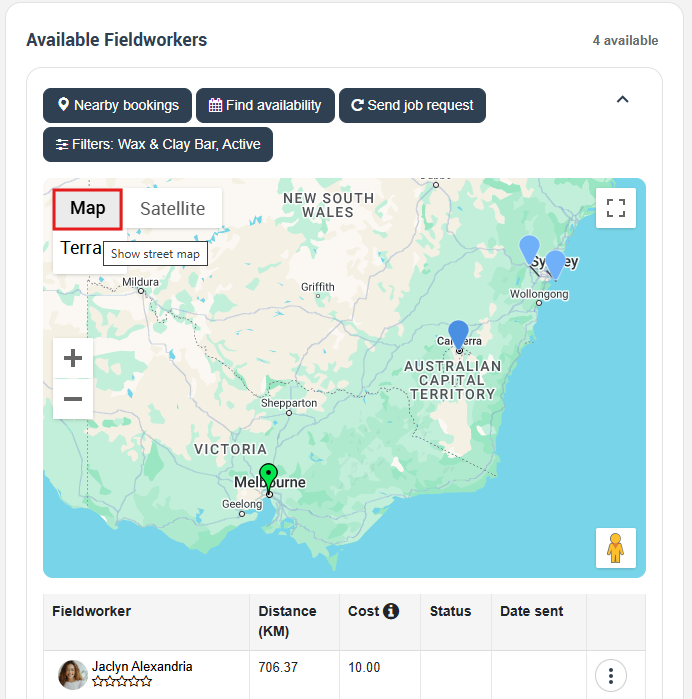
Field Worker Map
A dedicated map view in the Fieldworkers area can show the latest location of active fieldworkers. This helps dispatchers understand where the team is spread across the service area, identify coverage gaps, and respond faster during busy periods.
Nearby Workers from the booking screen
Inside the booking workflow, office staff can use nearby-worker style views to identify which fieldworkers are closest to the job address. This is especially helpful for urgent bookings, emergency callouts, and fast rescheduling.

Dynamic distance comparison
One of the most important advantages of this feature is that distance can be evaluated from the fieldworker’s current live location, not just their home or base address. This means dispatchers can compare the actual distance between the worker’s live position and the booking address and make better decisions about who can realistically arrive first.
What each feature changes in scheduling
These features affect scheduling at different points in the workflow.
Standard distance-based scheduling helps the system compare the booking address with each fieldworker’s home or base address. This helps identify which workers are suitable and nearby based on where they are normally located or operate.
Real-Time Field Worker Tracking adds another dispatch layer by comparing the booking address with the fieldworker’s current live GPS location, as long as the worker is online or otherwise actively tracked in the app.
Nearby Bookings proximity-based scheduling improves scheduling from a different angle. Instead of focusing on where the fieldworker is right now, it shows what work is already scheduled near the job location, helping you group jobs, reduce unnecessary travel, and choose a better route or schedule gap.
Booking-Tracking Workflow (GPS + ETA) does not decide who should get the job. Instead, it becomes useful after assignment, when you need visibility into the trip, arrival, progress, and completion of that specific visit.
Real-Time Field Worker Tracking vs other location features
OctopusPro includes multiple intersecting location features because dispatching, scheduling, travel tracking, and on-site job progress are not the same thing.
Two of these features use live GPS location, but the trigger rules and business purpose are different:
Booking-Tracking Workflow (GPS + ETA)
This is a visit-specific GPS workflow. It starts only after a booking has already been assigned and the fieldworker taps On The Way in the app. From that point onward, OctopusPro can track the fieldworker for that appointment, calculate ETA, show progress toward the job, record key milestones such as On The Way, Arrived, Started, and Finished, and optionally apply geofencing rules such as arrival validation and automatic check-out.
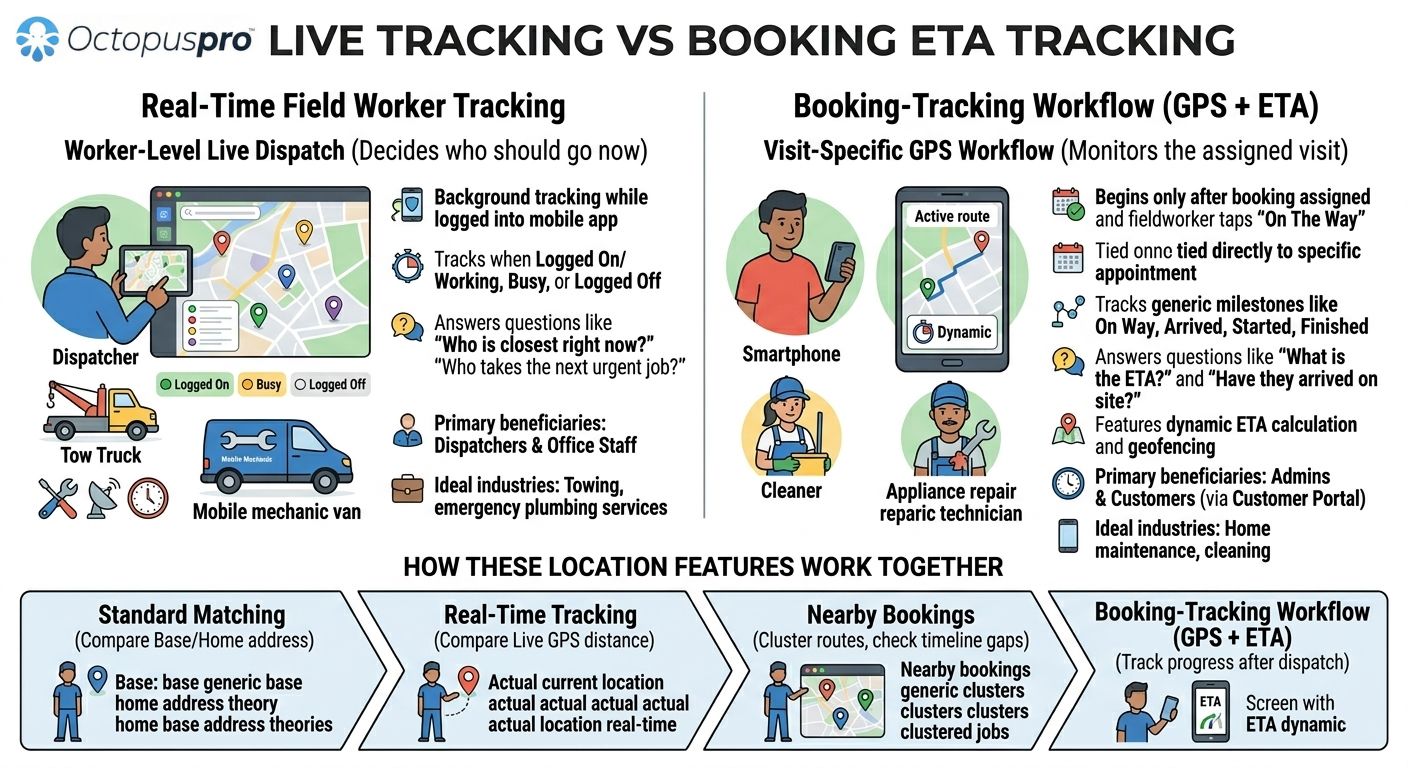
This workflow is mainly designed to answer questions such as:
- Has the assigned fieldworker started travelling yet?
- What is their ETA to this booking?
- Have they arrived on site?
- Has the job started or finished?
- Can the customer or office team follow the progress of this visit?
Real-Time Field Worker Tracking
This is a worker-level live dispatch feature. It is not tied to one booking. Instead, it tracks fieldworkers in the background while they are online in the mobile app.
If the fieldworker is logged on, their location can keep updating even when they are not currently assigned to a booking. If they are busy on a job, their location can still keep updating so dispatch can plan what to send them to next. When they log off, tracking stops.
This feature is designed to answer questions such as:
- Which fieldworker is physically closest right now?
- Which logged-on worker should take the next urgent job?
- Which busy worker is already near another upcoming booking?
- How far is the fieldworker from the job based on their current live location, not just their base address?
Fieldworker GPS Tracking & Live Job Status Updates is useful for both admins and customers, because it helps track the progress of an assigned visit after dispatch. Real-Time Field Worker Tracking is mainly an internal dispatch and scheduling tool for office teams and dispatchers.
Nearby Bookings proximity-based scheduling
This is a booking-first scheduling tool. It does not track the live GPS position of fieldworkers throughout the day. Instead, it starts from a booking or quote and shows other scheduled jobs near that job location.
It displays nearby bookings on an interactive map, in a road-distance-sorted list, and in a fieldworker timeline. This helps office staff and fieldworkers cluster appointments, compare qualified workers, confirm genuine schedule gaps, avoid unnecessary travel, and improve route efficiency before saving or reassigning work.

This feature is designed to answer questions such as:
- What other scheduled jobs are already near this booking?
- Which fieldworker already has work nearby?
- Is there a real available gap in that worker’s schedule?
- Can I move or assign this job in a way that creates a tighter route?
How these features work together
These features are not duplicates. They work best together as part of one end-to-end scheduling and dispatch workflow:
- First, use standard matching and distance-based scheduling to identify suitable fieldworkers for the job.
- Then, if Real-Time Field Worker Tracking is enabled, compare base distance with current live distance for online fieldworkers to see who is actually closest right now.
- Next, use Nearby Bookings to see what other scheduled jobs are already near the job location and whether there is a better route, gap, or fieldworker timeline option.
- Finally, once the job is assigned and the fieldworker taps On The Way, use the Booking-Tracking Workflow (GPS + ETA) to follow travel progress, ETA, arrival, on-site activity, and job completion.
In simple terms:
- Real-Time Field Worker Tracking helps you decide who should go now.
- Nearby Bookings helps you decide how to organise work around the booking.
- Booking-Tracking Workflow (GPS + ETA) helps you monitor the assigned visit after dispatch.
When to use each feature
- Use Real-Time Field Worker Tracking when you need to see live worker locations during the workday and compare current live distance as part of dispatch decisions.
- Use Nearby Bookings when you want to optimise the schedule around a booking, compare nearby scheduled jobs, and reduce route inefficiency.
- Use Booking-Tracking Workflow (GPS + ETA) when the booking is already assigned and you want to monitor the trip, ETA, and progress of that visit.
Which businesses benefit most?
Real-Time Field Worker Tracking is most valuable for businesses that need rapid dispatch decisions based on current fieldworker location, such as towing, roadside assistance, locksmith services, emergency plumbing, urgent electrical work, mobile repairs, reactive maintenance, and any business handling last-minute callouts.
Nearby Bookings is especially valuable for businesses that manage scheduled rounds, route efficiency, or clustered appointments, such as cleaning, pest control, facilities management, property services, HVAC maintenance, inspections, courier work, and recurring home or commercial services.
Booking-Tracking Workflow (GPS + ETA) is especially useful for customer-facing service visits where ETA visibility, arrival validation, and progress updates matter, such as home maintenance, field repairs, cleaning, restoration, appliance repair, trades, and appointment-based on-site services.
How to use it
To get the most value from Real-Time Field Worker Tracking:
- Make sure fieldworkers are logged in to the OctopusPro mobile app during work hours.
- Ensure device location permissions and background location access are enabled where required.
- Keep fieldworker services, service areas, working hours, and availability settings accurate.
- Use the admin map and nearby-worker style views to compare fieldworker locations against the booking address.
- Review both base distance and current live distance where available before making urgent or same-day dispatch decisions.
- Use Nearby Bookings when you want to optimise the route around the booking, and use Booking-Tracking Workflow after the fieldworker is assigned and travelling.

Best practices
- Ask fieldworkers to log on at the start of every shift and log off when finished.
- Make sure location permissions are enabled, including background location access where required by the device.
- Keep fieldworker services, service areas, and working hours accurate so map-based suggestions remain useful.
- Use live location together with service matching, availability, and job requirements rather than location alone.
- Review nearby workers or nearby bookings whenever handling urgent, same-day, or rescheduled work.
- Encourage workers to keep the app updated and stay connected during work hours for more reliable location updates.
FAQs
Does tracking continue while a fieldworker is busy on a job?
Yes. A busy worker can still appear with an updated location so dispatchers can plan the next nearby booking more accurately.
Does tracking stop when a fieldworker logs off?
Yes. Once the worker logs off, location tracking should stop so off-duty users are no longer shown as active on the live map.
Does this replace service areas or travel radius settings?
No. Service areas and travel rules are still important for matching the right workers to the right jobs. Live tracking improves dispatching by showing where eligible workers are currently located.
Does this replace booking availability and working hours?
No. Live tracking works best when used together with working hours, time-off blocks, and availability rules. A worker may be nearby, but still unavailable or unsuitable for the booking.
Does this replace standard distance-based scheduling from the fieldworker’s base or home location?
No. Standard distance-based scheduling is still useful. Real-Time Field Worker Tracking adds an extra dispatch layer by also showing distance from the worker’s current live location when they are online.
How accurate are the map updates?
The map reflects the latest location updates received from the mobile app. Update timing can vary based on connectivity, battery settings, and device permissions, so it is best used as a live operational guide rather than second-by-second surveillance.
How is this different from live visit tracking after pressing On The Way?
Visit tracking focuses on the progress of an active booking after the fieldworker has been assigned and starts travelling. Real-Time Field Worker Tracking extends dispatch visibility earlier in the workflow by helping office staff see logged-on workers and assign the next job more intelligently.
How is this different from Nearby Bookings?
Nearby Bookings helps you organise scheduled work around a booking using nearby future jobs, road distance, and timeline views. Real-Time Field Worker Tracking helps you see where active fieldworkers are right now using live GPS location.
Related guides
- Fieldworker GPS Tracking & Live Job Status Updates
- Nearby Bookings proximity-based scheduling
- Fieldworker Availability Finder
- Fieldworker Service Areas & Locations
- Manage Fieldworker Working Hours & Availability
- Fieldworker App Guide: Profile, Availability & Job Updates
Real-Time Field Worker Tracking helps service businesses dispatch faster, reduce unnecessary travel, and improve customer response times by combining live location visibility with smarter scheduling tools. When used together with standard distance-based matching, Nearby Bookings, service areas, availability rules, and Booking-Tracking Workflow (GPS + ETA), it becomes a powerful operational tool for field service teams that need to move quickly and stay efficient throughout the day.
To stay updated, please subscribe to our YouTube channel.