
[vc_row][vc_column width=”1/4″][vc_widget_sidebar sidebar_id=”sidebar-1″][/vc_column][vc_column width=”3/4″][vc_column_text]
OctopusPro User Guide – Platform Overview
OctopusPro is an all-in-one service management platform that helps you run bookings, scheduling & dispatch, quoting, invoicing, payments, customer communication, and mobile field operations from a single system. It’s designed for mobile/on-site, fixed-site/studio, virtual/online, and group/class-based service businesses—scaling from solo operators to multi-location teams.

On this page
- What OctopusPro is
- How the platform is structured
- Who it’s for (service models)
- Core outcomes & benefits
- End-to-end workflow (start to finish)
- Quick start: what to set up first
- Audit trails, logs & reporting
- Next step: book a free support call
What OctopusPro is
Think of OctopusPro as your operations hub for service delivery. Instead of managing leads, jobs, calendars, invoices, payments, and customer messages across multiple tools, OctopusPro brings everything together so your team can work from one source of truth.
Common use cases include:
- Field service management (FSM): job scheduling & dispatch, technician routing, on-site check-in/out, forms, photos, signatures, and field payments.
- Appointment scheduling: real-time availability, staff/resource allocation, automated reminders, and online self-booking.
- CRM + job history: customer profiles, communication logs, repeat services, and service history visibility.
- Revenue workflows: quotes/estimates, deposits, invoicing, payment collection, refunds, and accounting sync.
How the platform is structured
OctopusPro is built around three connected experiences, so every stakeholder sees the right information at the right time:
- Admin & Office Portal (web): manage leads/inquiries, quotes, bookings, scheduling & dispatch, invoicing, payments, staff, reporting, automations, and settings.
- Fieldworker Mobile App: receive jobs, navigate, check in/out, capture photos & signatures, complete checklists/forms, message office/customers, and take payments (where enabled).
- Customer Portal: customers can request/confirm bookings, view service history, approve quotes, pay invoices, redeem vouchers, and receive updates—depending on what you enable.
The platform also supports integrations (payments, accounting, maps, messaging), automations (reminders & workflows), and role-based access control so different team members only see and do what they’re allowed to.
Helpful links:
- Configuring User Roles, Permissions & Access Control
- API, Webhooks & Third-Party Integrations
- Google Calendar Integration
Who it’s for (service models)
OctopusPro supports multiple service delivery models. You can run one model or mix several (for example: a studio that also offers mobile visits and virtual sessions, or a delivery business that also offers in-store pickup).
Common combinations:
- Mobile + recurring maintenance: weekly/fortnightly/monthly service routes (e.g., lawn care, cleaning, pool care).
- Studio + virtual: in-person appointments plus online sessions (e.g., coaching, tutoring, telehealth).
- Fixed-site + group sessions: classes/workshops with capacity limits (e.g., fitness, training, tours).
- Transport + multi-address: pickup → drop-off jobs (e.g., towing, courier, removals, shuttle services).
| Service model | Typical industries (more examples) | How OctopusPro helps (with related guides) |
|---|---|---|
| Mobile / on-site (field service) | Cleaning (residential/commercial), trades (HVAC/electrical/plumbing), appliance repair, pest control, lawn care, mobile beauty & massage, pet grooming, IT support, installations, inspections, rentals/deliveries | Scheduling & dispatch, real-time job updates, GPS navigation, proof of work (photos/forms/signatures), and invoice & payment collection. Field Service Management (FSM) • Fieldworker Check-In/Out • Collect Invoice Payments • Nearby Bookings (Proximity Dispatch) |
| Fixed-site / studio / storefront | Salons & spas, clinics, physio, studios, gyms/yoga, vet/grooming, tutoring centres, workshops, venues/room hire, photo studios, escape rooms, childcare services | Staff/room/resource scheduling, multi-branch management, in-store booking flows, customer self-booking, and POS-style operations (where enabled). Storefront vs Mobile vs Remote • Multi-Location POS & Branches • Calendar Overview |
| Virtual / online (remote services) | Telehealth, counselling, coaching, e-learning, tutoring, consulting, remote support, virtual assistants, online music/art lessons | Time-zone aware scheduling, online checkout, automated reminders, and portal-based self-service (view bookings, invoices, and updates). Remote Service Management • Enable Online Bookings • Customer Portal (Profile & Booking History) |
| Group booking / class scheduling | Fitness classes, workshops, tours, camps, team-building, training sessions, charters, shared appointments, group events | Capacity (seats), attendee lists, per-person or flat-fee pricing, automated confirmations/reminders, and package-style offers. Group Booking & Class Scheduling • Service Packages & Bundles • Recurring / Repeat Bookings |
| Mileage-metered transport / delivery | Towing, removals, courier, shuttles, NEMT, chauffeurs, roadside assistance, fuel/water delivery, waste collection, logistics | Multi-stop workflows (pickup → drop-off), distance-based fees, and GPS mileage tracking for accurate billing and logs. Multi-Address Bookings (Pickup → Drop-off) • Distance-Based Travel Fees / Mileage Billing |
| Recurring maintenance / repeat services | Cleaning contracts, pool/lawn care, pest prevention plans, maintenance visits, aftercare services, recurring tutoring/coaching, follow-up health sessions | Generate repeat schedules, keep consistent staffing, automate reminders, and optionally allow customers to create recurring bookings in the portal. Recurring / Repeat Booking Software • Portal: Allow Customers to Book Recurring • Packages (Prepaid Multi-Visit Deals) |
| Team-based / multi-crew jobs | Large cleaning jobs, removals, landscaping crews, complex installs, specialist + assistant workflows, apprenticeships, QA/inspection add-ons, multi-trade work | Assign multiple fieldworkers to the same booking/service, coordinate schedules, and track progress across the crew. For teams that operate as lead + assistants, you can also add and manage Subworkers (crew members) under a lead fieldworker—each with their own login and tracked activity—so crew-based delivery, accountability, and timesheets are easier to manage. Assign Multiple Fieldworkers to a Booking • Manage Subworkers Under Fieldworkers (Crew Members) • Allow Fieldworkers to Add Subworkers • Fieldworker Permissions (Enable/Control Subworker Access) • Fieldworkers Accept/Decline Job Requests |
| Compliance, inspections & proof-of-work | Insurance jobs, restoration, building inspections, safety checks, vehicle condition reports, end-of-lease cleaning, QA audits, regulated industries | Capture structured forms/checklists, enforce “before/after” photo rules, collect eSignatures, and keep time-stamped records per job. Forms & Checklists (Overview) • Forms & Checklists Setup • Require “Before” Photos at Check-In • Collect Customer Signatures |
| Territory-based operations & location pricing | Franchise networks, multi-suburb service areas, travel-heavy services, premium-zone pricing (CBD vs outer suburbs), region-based teams | Define service territories, route work efficiently, and apply pricing rules by zone/area where required. Fieldworker Service Areas (Territories) • Geo-Pricing Zones |
| Quote-first / project-based work | Renovations, custom installs, restorations, large cleaning projects, commercial contracts, work that requires approval before scheduling | Create and send quotes/estimates, collect customer approval (portal/email), then convert approved quotes into bookings without retyping. Quote & Estimate Management • Customer Accept/Decline Quotes • Create a Quote/Estimate |
Related setup guides:
- Service Delivery Types (Storefront, Mobile & Remote)
- Mobile / Field Service Management (FSM)
- Enable Online Bookings Through Your Website
- Customer Portal (Bookings, Payments, Profile & Self-Service)
- Group Booking & Class Scheduling
- Remote Service Management (Virtual Bookings)
- Distance-Based Travel Fees / Mileage Billing
- Multi-Address Bookings (Pickup → Drop-off)
- Recurring / Repeat Bookings
- Service Packages & Bundles (Prepaid Multi-Visit Deals)
- Multi-Location POS for Branches & Storefronts
Core outcomes & benefits
OctopusPro is designed to improve the outcomes that matter most in service businesses—customer experience, operational control, team efficiency, and reliable cash flow.

- Better customer experience: branded portal, clear notifications, live updates/ETAs (where enabled), and faster communication reduce inbound calls.
- Operational control: dashboards, filters, permissions, and audit logs help you standardise operations across teams and locations.
- More efficient scheduling: availability-based booking, dispatch tools, and automation reduce manual admin work.
- Faster cash collection: quotes, deposits, invoices, and online checkout shorten the time from booking to payment.
- Scalable setup: add users, teams, and locations while keeping processes consistent using permissions and templates.
- Audit-ready records: change logs and communication logs support accountability and compliance requirements.
End-to-end workflow (start to finish)
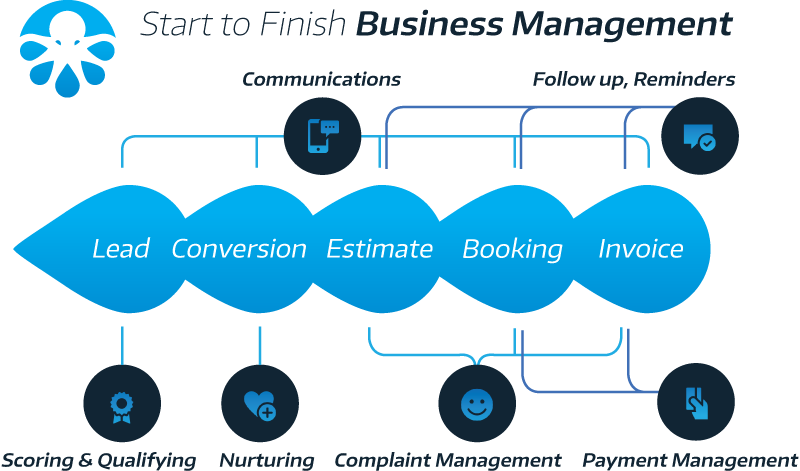
Most businesses run a predictable lifecycle—from lead capture to job completion and follow-ups. OctopusPro supports the full workflow below.

- Capture an inquiry/lead: from your website, phone, social channels, or manual entry.
- Qualify and follow up: tag, prioritise, and set follow-up reminders so leads don’t slip through.
- Quote or book: create fixed-price or hourly services, capture deposits (if required), and confirm schedules.
- Plan resources: allocate staff, equipment, rooms, vehicles, or crews based on availability and capability.
- Dispatch: assign jobs manually or automatically and push job details to fieldworkers instantly.
- Deliver the service: fieldworkers check in/out, complete forms, collect photos/signatures, and update job status.
- Invoice & collect payment: take card/bank transfer/other payments (depending on your enabled methods).
- Request feedback: automatically send review requests and capture ratings to improve quality and reputation.
- Follow up: schedule recurring reminders, maintenance visits, rebook prompts, or package usage reminders.
- Report and improve: track KPIs, profitability, utilisation, and customer trends to optimise operations.
Quick start: what to set up first
If you’re an admin/owner:
- Create your admin account and select a subscription plan.
- Log in to OctopusPro and configure your service delivery types.
- Set your job assignment & dispatch method (manual vs automated).
- Configure payment methods and (optional) accounting sync: Xero/QuickBooks integration overview.
- Enable your Customer Portal and, if desired, online bookings through your website.
- Add “Book Now” buttons to your site and set up notifications & alerts.
- Lock in governance with roles & permissions and teach your team to use universal search & filters.
If you’re onboarding fieldworkers:
- Confirm access and permissions: Fieldworker permissions & access control
- Make sure they can sign in: Admin / Fieldworker / Customer login guide
- Enable real-time updates: Notifications, discussions, SMS & call alerts
Start your free trial: Create your FREE trial account
Audit trails, logs & reporting
For accountability and troubleshooting, OctopusPro includes detailed logs and audit trails across bookings, communications, automations, and user actions. These tools are especially helpful for dispute resolution, compliance, staff coaching, and operational analysis.
- Booking change log: Booking History & Audit Log
- Booking activity timeline: Booking Activity
- User accountability: User Activity Log
- Automation monitoring: Automations / Scheduled Tasks Log
- Email audit trail: Outbound Email Log
- Call tracking: Call History Log
- Performance insights: Live Reports & Analytics
Tip: When investigating “what happened?” on a booking (changes, messages, reminders, customer disputes), start with the Booking History & Audit Log and the User Activity Log to identify the exact timeline and the user who made each change.
Next step: book a free support call
Want a tailored walkthrough for your industry, service model, and workflows? Book a free support call and we’ll help you set up the right configuration, automations, and portal experience for your customers.
Schedule your free support call ➜
To stay updated, please subscribe to our YouTube channel.
[/vc_column_text][/vc_column][/vc_row]