
Transfer Ownership (Sales Rep) for Quotes, Bookings & Invoices
In OctopusPro, every quote, booking, and invoice has an assigned Sales Rep (Owner)—also referred to as the record owner. This is the main admin/office user responsible for progressing the job (follow-ups, customer communication, internal coordination, and overall accountability).

By default, the owner is typically the admin/office user who created the record. However, you can transfer ownership to another user anytime you need to reassign responsibility (for example, during staff handovers, workload balancing, or commission/reporting accuracy).
Important clarification (to avoid confusion)
- Sales Rep (Owner) / Record Owner: The internal owner of the quote/booking/invoice for accountability and reporting.
- Assigned Fieldworker: The person who performs the work (separate from Sales Rep/Owner).
- Account / Subscription Owner: The person who manages the overall OctopusPro account and billing (this guide does not transfer the entire OctopusPro account).
Table of contents
- 1) How quotes, bookings, and invoices are linked
- 2) What “Sales Rep / Owner” means (and why it matters)
- 3) When you should transfer ownership
- 4) How ownership works across quote → booking → invoice
- 5) How to transfer the Sales Rep (Owner)
- 6) Notes & FAQs
1) How quotes, bookings, and invoices are linked
In OctopusPro, a quote, booking, and invoice represent the same underlying job at different stages of your workflow:
- When a quote is created, it receives a unique Quote Number.
- When a quote is converted to a booking, it receives a unique Booking Number (while remaining linked to the same job record).
- When an invoice is generated, it receives a unique Invoice Number (and remains linked to the same job record).
- A single booking can have more than one invoice (e.g., progress invoices, split billing, staged payments, group bookings, or other billing workflows).
Important: Even though the job may display different reference numbers (Quote/Booking/Invoice), it remains the same job record moving through lifecycle statuses.
2) What “Sales Rep / Owner” means (and why it matters)
The Sales Rep (Owner) is the primary admin/office user accountable for managing the job—follow-ups, customer communication, internal coordination, and ownership of outcomes.
Keeping ownership accurate helps your business by supporting:
- Accountability: One clearly assigned person responsible for progressing the quote/booking/invoice.
- Operational handovers: Cleaner transitions when jobs move between office users or teams.
- Reporting: Owner-based reporting and performance tracking by user.
- Commissions (if used): Assigns sales credit to the correct team member for sales-by-employee reporting.
Example: A quote is created by one admin user, then handed to another team member to close and manage the job. Transferring ownership ensures reporting and accountability reflect the person now responsible.
3) When you should transfer ownership
Common scenarios include:
- Staff changes / coverage: Reassign jobs when someone is away, changes roles, or leaves the business.
- Operational handover: Move responsibility to the user best placed to manage the customer relationship or scheduling.
- Sales & reporting accuracy: Ensure the correct Sales Rep receives credit before reviewing performance reports.
- Workload balancing: Reassign ownership to distribute work across your office/admin team.
4) How ownership works across quote → booking → invoice
Ownership is synced across the job lifecycle. This means transferring the Sales Rep (Owner) on a quote, booking, or invoice updates the owner for the same underlying job record across linked records.
- Transfer the owner on the quote → it updates the linked booking and associated invoice(s).
- Transfer the owner on the booking or invoice → it updates ownership across the linked job record as well.
5) How to transfer the Sales Rep (Owner)
You can transfer ownership from two common places:
- During creation or editing (in the record’s Details section)
- From the View/Manage page by clicking the Sales Rep field in the top details area
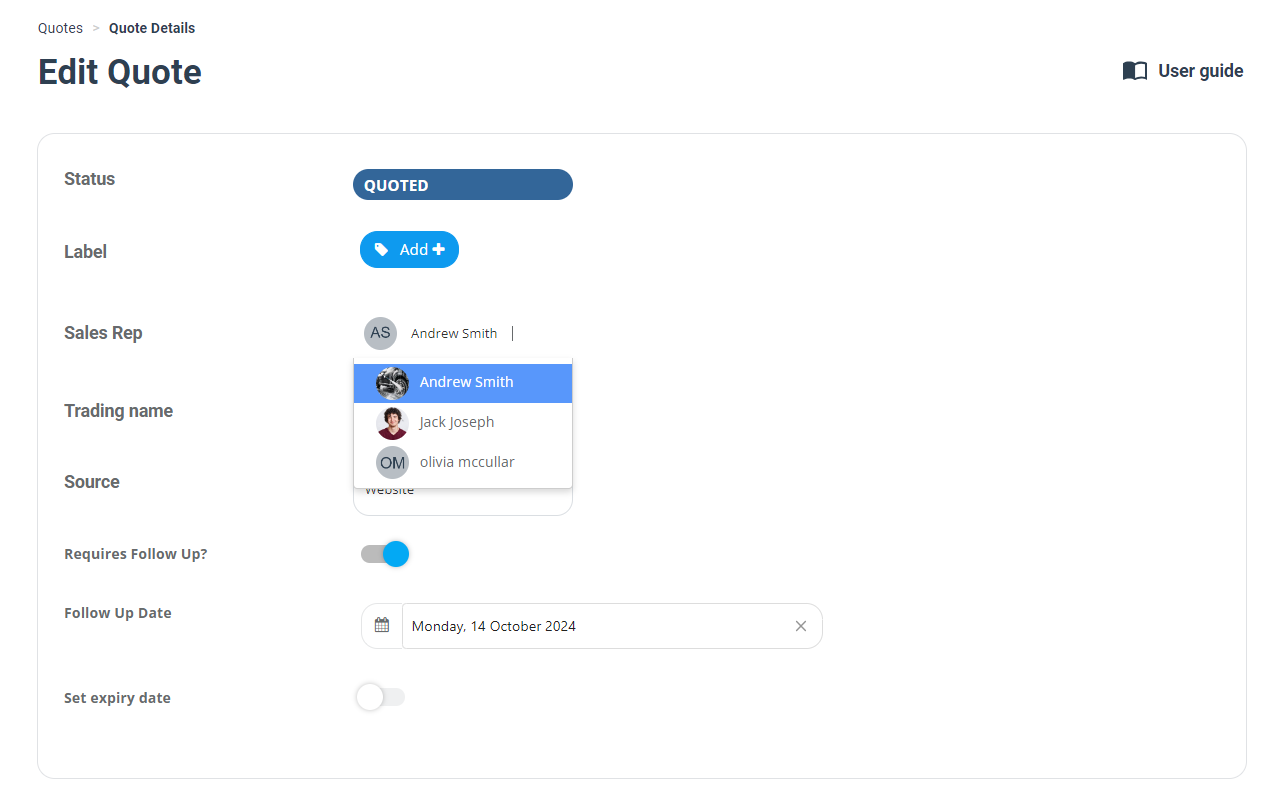
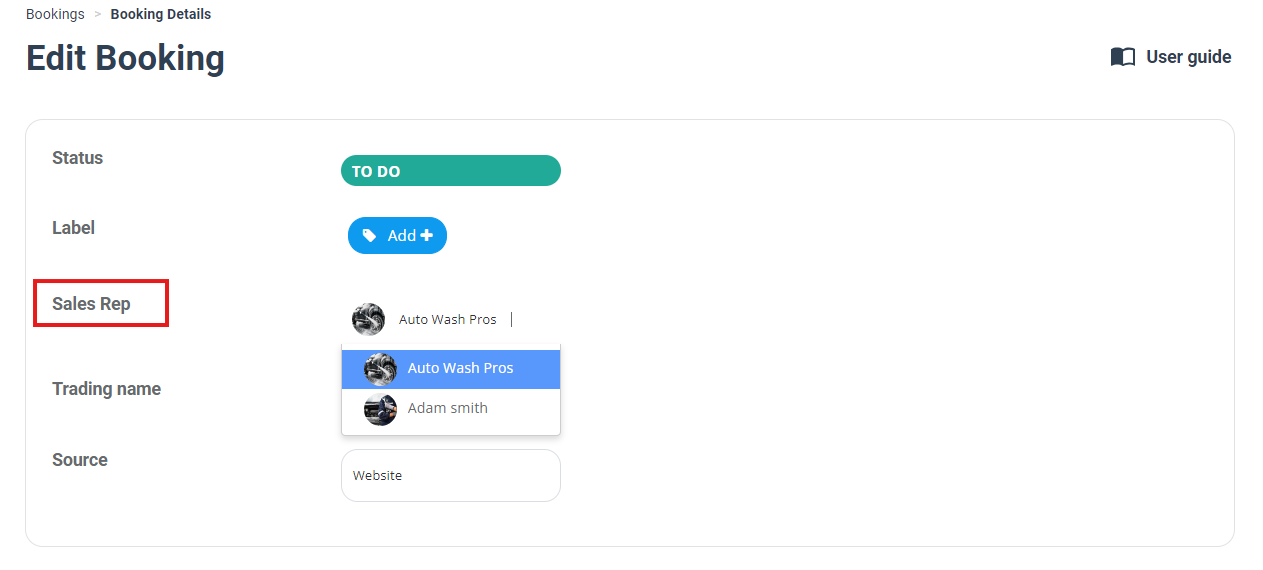
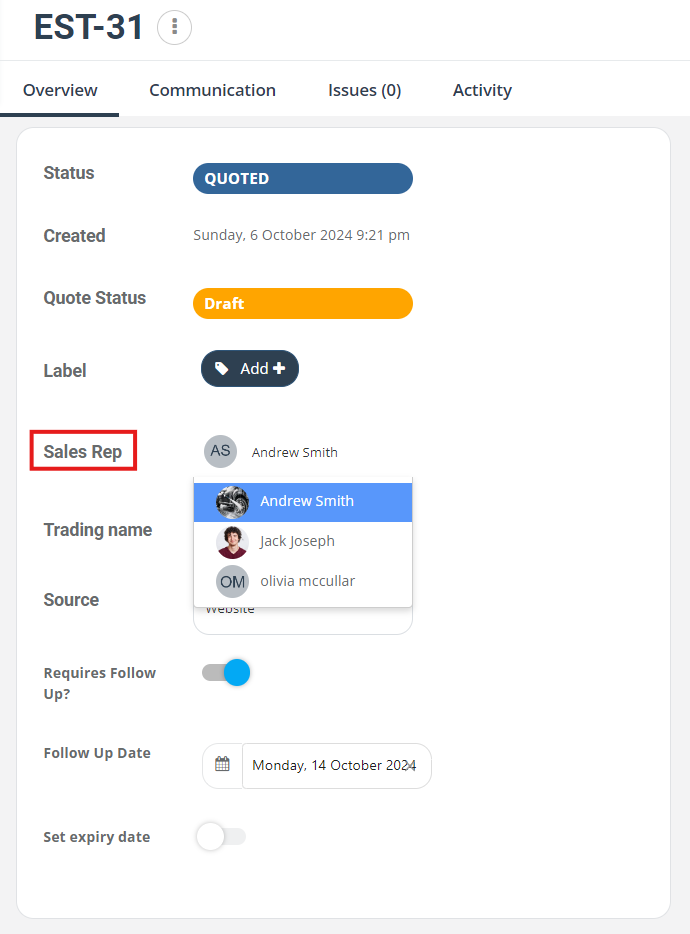
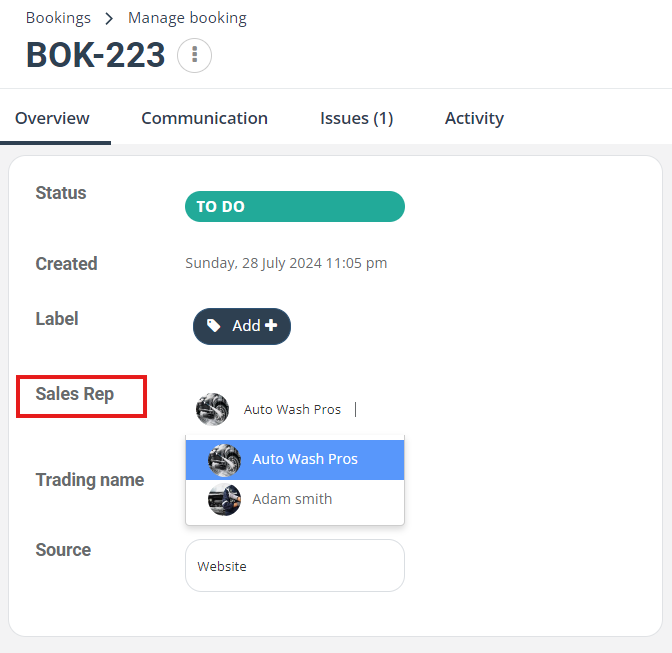
A) Transfer ownership for quotes
- Go to Quotes from the main menu.
- Open the quote you want to reassign.
- In Details, find Sales Rep, then select the new owner.
- Alternatively, from the quote View/Manage page, click the Sales Rep field and choose the new owner.
B) Transfer ownership for bookings
- Go to Bookings from the main menu.
- Open the booking you want to reassign.
- In Details, click Sales Rep.
- Select the admin/office user you want to assign as the new owner.
C) Transfer ownership for invoices
- Go to Invoices (or open the invoice from the linked booking).
- Open the invoice you want to reassign.
- In Details, find Sales Rep and select the new owner.
6) Notes & FAQs
Will the original owner be notified if ownership is transferred?
Yes. When ownership is transferred, the original owner receives a notification about the change. This allows them to review the transfer and dispute it if needed (for example, if the transfer was made in error or without approval).
How can someone dispute or reverse an ownership transfer?
- Review the record details to confirm the current Sales Rep (Owner).
- Check the activity/history (where available) to see when the ownership change occurred.
- If appropriate, an authorized user can transfer ownership back to the correct owner.
- If ownership transfers should be restricted, an admin can adjust role permissions to limit who can change the Sales Rep field.
Who can be selected as the Sales Rep (Owner)?
The Sales Rep (Owner) list typically includes admin/office users (not fieldworkers). Which users you can assign depends on your account configuration and permissions.
Will transferring the Sales Rep impact reporting or commissions?
Yes. Ownership is commonly used for reporting and (where applicable) commission attribution. Make sure ownership is correct before running performance, sales-by-employee, or commission reports.
What if I can’t edit the Sales Rep field?
This usually means your user role does not have permission to edit that record/field. Ask your account administrator to review your access level and permissions.
Related: Configuring User Roles, Permissions & Access Control
Does transferring ownership change the assigned fieldworker?
No. The Sales Rep (Owner) is the internal record owner. Fieldworker assignment is managed separately.
Can a booking have more than one invoice?
Yes. A booking can have multiple invoices (e.g., progress invoices, split billing, staged payments, etc.). Ownership remains linked across the job record.
Related guides
To stay updated, please subscribe to our YouTube channel.