
Service Packages & Bundles – Sell Multiple Bookings Together
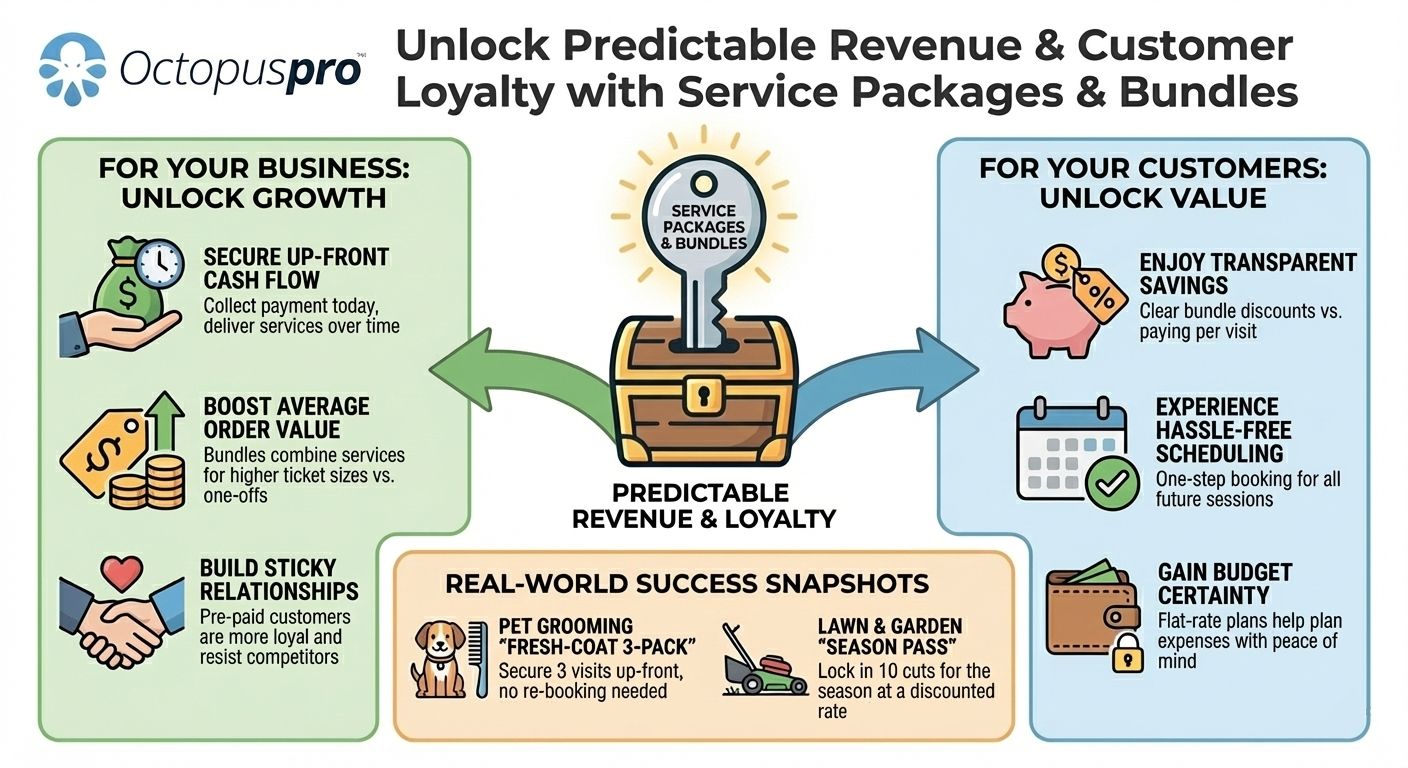
Customers often need the same job done again and again—weekly pool cleaning, a five-session dog-training plan, twelve-session tutoring plans, or multi-lesson driving courses. Service Packages in OctopusPro let you bundle those repeat bookings—or a curated mix of related offerings—into one prepaid or pay-as-you-go deal, complete with its own price, validity period, and scheduling rules.
What are Service Packages?
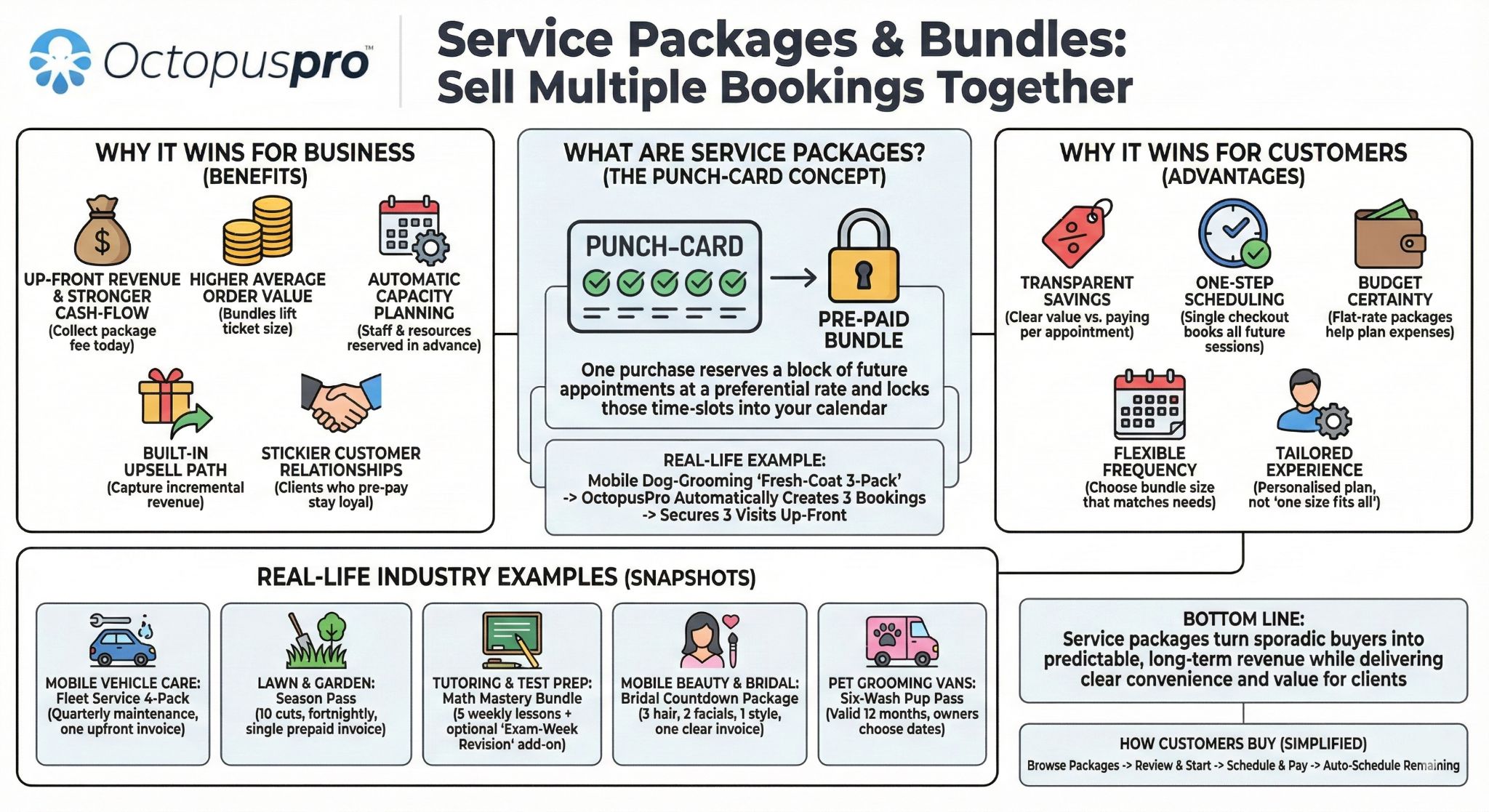
In OctopusPro, a package is a pre-paid bundle of repeated bookings for the same service (or the same add-on) delivered on a schedule you define—weekly, fortnightly, monthly, or ad-hoc. Think of it as a punch-card: one purchase reserves a block of future appointments at a preferential rate and locks those time-slots into your calendar.
Example – A mobile dog-grooming business sells a “Fresh-Coat 3-Pack.” When a customer buys the package, OctopusPro automatically creates three grooming bookings—one every four weeks—so the pet owner doesn’t have to re-enter details each time and the business secures three visits up-front.
Packages streamline repeat work for you, spare customers the hassle of re-booking, and unlock volume-based pricing incentives without requiring complex promo codes or manual scheduling.
What you can do
- Create a service package – pick any service(s), set how many bookings are included, choose whether they recur on a timetable (recurring intervals), and define how long the credits stay valid (package validity).
- Flexible pricing & discounts – charge a lump-sum, per-booking rate, or apply a built-in package discount to make the bundle more attractive than one-off bookings.
- Sell anywhere – packages appear in the Customer Portal, branded app, quotes, and invoices. Customers or staff can schedule individual bookings until the credit balance hits zero.
- Streamlined Invoicing: The Service Bundling feature also simplifies invoicing. When customers book a package, all services within the bundle are automatically included in the invoice, ensuring transparency and accuracy.
- Automatic tracking & billing – OctopusPro deducts each completed booking, shows remaining credits to staff and customers, and rolls usages into combined or per-booking invoices—your choice.
Package Invoicing Rules
After you set the price and number of bookings, decide how OctopusPro should bill the customer.
| Setting | What happens | Typical use case |
|---|---|---|
| Generate individual invoices for each booking | One invoice per appointment. | Pay-per-visit tutoring, recurring maid service. |
| Generate one invoice that combines all bookings | A single lump-sum invoice for the whole bundle. | Prepaid five-wash car-detailing pass, 10-class yoga package. |
| Don’t generate any invoices when bookings are created | No invoice until you raise it manually later. | Contract work where billing is done at project close. |
If you choose individual invoices you’ll also see When would you like the invoices to be created?
- All invoices at once – create every invoice immediately so the client can pre-pay the full bundle.
- First booking invoice only – generate only the first invoice now; future ones are issued automatically as each booking comes due.

Example
Weekly Lawn-Care Package (12 visits) – generate all invoices at once so the client can pay up-front and receive a discount.
Weekly Music Lesson Package (10 lessons) – generate only the first invoice now; each subsequent invoice is released the week of the lesson.
Add-on & Variant Packages (Option-Level)
Need to sell blocks of an optional extra—for example, four premium wax treatments inside a car-wash plan?
- Settings ▶ Service Settings ▶ Services → Manage Custom Fields
- Find the option (e.g. “Premium Wax”) → Edit → open the Package tab.
- Configure bookings, price, and invoicing rules just like a normal service package.
The option-level package is tracked separately and can be billed together with—or independently from—the main service bundle.
Industry snapshots — how real businesses package services
- Mobile Vehicle Care
Fleet Service 4-Pack – Schedule four quarterly maintenance bookings per van (inspection + oil change). One upfront invoice, individual work orders generated each quarter so technicians and fleet managers see every upcoming visit. - Lawn & Garden Maintenance
Season Pass (10 cuts) – Lock-in five months of fortnightly mowing at a discounted per-visit rate. OctopusPro auto-creates the recurring bookings and issues a single prepaid invoice, reducing no-shows and cash-flow gaps. - Tutoring & Test Prep
Math Mastery Bundle – Sell five weekly online lessons plus an optional “Exam-Week Revision” add-on package (two extra sessions). The add-on is configured on the custom-field option, so only families that tick “Exam Boost” are charged for the extra hours. - Mobile Beauty & Bridal
Bridal Countdown Package – Combine three hair trials, two facials, and one on-site wedding-day styling into a single bundle. Separate fieldworkers (hair stylist vs. esthetician) are assigned to each booking, while the bride receives one clear invoice and a consolidated schedule in her portal. - Pet Grooming Vans
Six-Wash Pup Pass – Pre-sell six mobile grooms valid for 12 months. Owners choose dates later in the portal; invoices for each wash are auto-generated only when an appointment is confirmed, keeping revenue recognised at service time.
These snapshots show how packages, add-on option bundles, and flexible invoicing work together to drive repeat bookings, simplify scheduling, and give clients clear value for money.
Why sell service packages? — measurable wins for you and your clients
Business advantages
- Up-front revenue & stronger cash-flow
Collect the package fee (or first instalment) today while OctopusPro drips the individual bookings into the calendar over weeks or months. - Higher average order value
Bundles combine complementary jobs (e.g. tune-up + filter change), lifting the ticket size compared with one-off bookings. - Automatic capacity planning
Recurring bookings are generated on your chosen rhythm, so staff and resources are reserved well in advance—no spreadsheet juggling. - Built-in upsell path
Add optional package extras at the custom-field-option level (e.g. “VIP interior detail” on a car-wash bundle) to capture incremental revenue without hard-selling. - Stickier customer relationships
Clients who pre-pay for multiple appointments are far more likely to stay loyal and resist competitors.
Customer advantages
- Transparent savings
Side-by-side price comparison shows the bundle cost versus paying per appointment, so value is obvious. - One-step scheduling
A single checkout books every future session (or lets the customer pick dates later in their portal), eliminating repetitive forms and calls. - Budget certainty
Flat-rate packages (with optional instalments) help customers plan expenses—especially attractive for property managers or parents arranging tutoring blocks. -
Flexible frequency – Choose the bundle size (3, 5, 10 sessions) that matches your schedule and budget.
- Tailored experience
Packages can mix service types, locations (storefront, on-site, or virtual), and add-on options, giving customers a personalised plan instead of a generic “one size fits all.”
Bottom line – Service packages turn sporadic buyers into predictable, long-term revenue while delivering clear convenience and value for clients.
Setting up Packages in OctopusPro

Packages let you pre-sell a fixed number of future bookings for one service—perfect for maintenance plans, class passes, or seasonal care. You can publish them as:
| Package style | When to use it | Where to build it |
|---|---|---|
| Standalone package | You only sell the service as a bundle (e.g. “10-Cut Lawn Plan”). | Create a new service record that represents the package. |
| Package option inside an existing service | Let customers choose one-off or buy a multi-booking pass for the same service (e.g. “Single Massage” vs. “5-Massage Pack”). | Add the package to the original service in Edit Service. |
A. Creating a Standalone package

- Settings ▸ Service Settings ▸ Services ▸ + Create New
- Service Name – call it something recognisable, e.g. Fleet Oil-Change – 4-Pack.
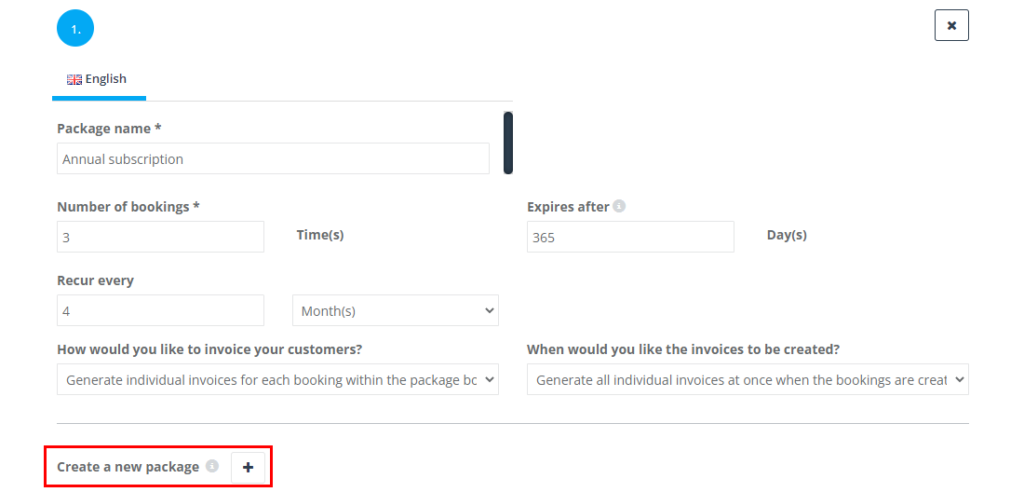
- Click Create a new package + and complete the form:
| Field | What it means |
| Package Name | Customer-facing name (required). |
| Number of Bookings | How many appointments the pass includes (required). |
| Recur Every | Default spacing between bookings (weeks, months). Leave blank to let customer pick dates. |
| Expires After (days) | Optional validity period; leave blank for “never expires”. |
- Click Next to reach Cost & Payrate. Enter the discounted per-booking price (e.g. set $60 if the normal oil-change price is $70).
- Save. OctopusPro now treats this service as a prepaid bundle and auto-creates each booking on the chosen schedule.
B. Adding a package inside an existing service

- Settings ▸ Service Settings ▸ Services ▸ Edit the service (e.g. Standard Lawn-Mowing).
- Scroll to Packages and click Create a new package +.
- Complete the same fields as above. Example:
| Package Name | Number of Bookings | Recur Every | Expires After |
| Lawn-Care Season Pass | 10 | 2 weeks | 365 |
- (Optional) Add another package named Single Visit with Number of Bookings = 1 so customers can still book once-off.
- Save. At checkout, customers will see both Single Visit and Season Pass prices.
Field definitions & tips
- Number of Bookings – must be an integer ≥ 1. OctopusPro generates that many bookings when the package is purchased.
- Recur Every – drives automatic scheduling. Use “0” or leave blank if appointments will be booked manually later.
- Expires After – stops unused credits after the period; prevents indefinite liabilities.
- Pricing – packages inherit the service’s pricing model (per time or per unit). Enter a lower rate to show savings.
Example workflows
- Mobile Mechanic – Quarterly Fleet Plan: 4 bookings, recur every 3 months, $60 per service (normal $75).
- Gardening Service – 10-Cut Pass: 10 bookings, recur every 2 weeks, expiry 365 days.
- Online Tutoring – Math Booster: 5 sessions, customer chooses dates, expiry 90 days.
- Spa & Beauty – Bridal Countdown: 6 bookings (hair + skin), custom schedule, one upfront payment.
Packages lock-in revenue, automate repeat scheduling, and give clients clear value—all managed from a single OctopusPro screen.
How Customers Buy & Schedule Packages in the Portal
A. Booking a Standalone Package
- Browse Packages
Customer Portal ▸ Services → choose a package card (e.g. “Oil-Change 3-Pack”).
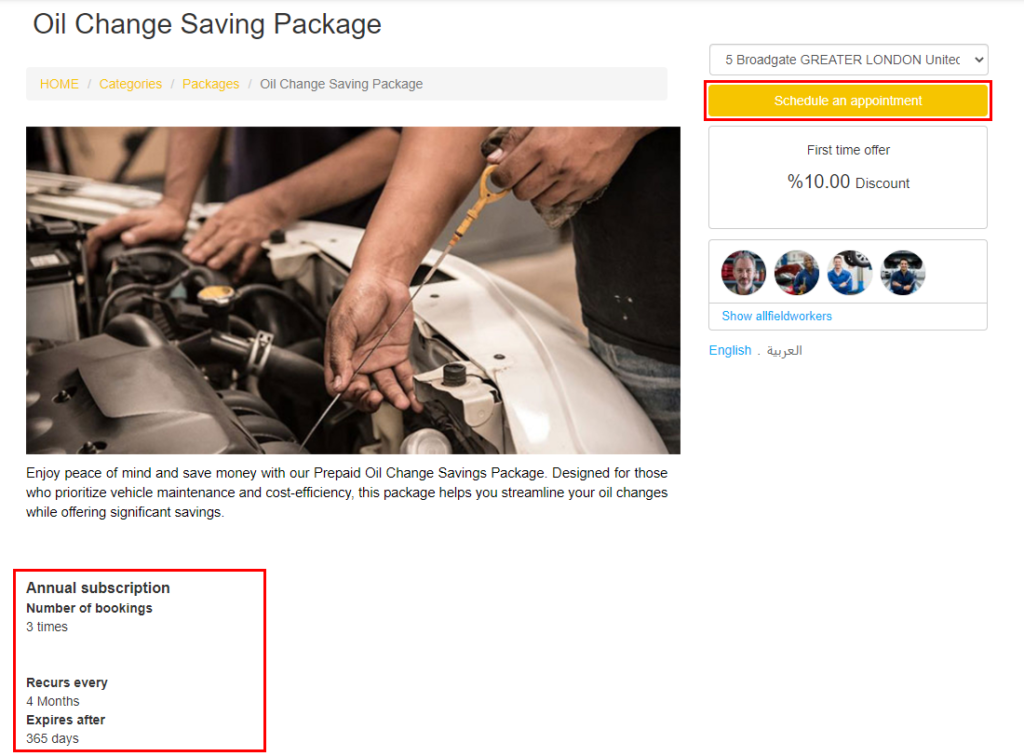
- Review & Start
On the package detail page the customer sees:- ✔ How many appointments are included
- ✔ Any expiry date
Click Schedule Appointment.
- Enter Location → Qty → Continue
Location (address or vehicle) → Default Quantity = 1 package.
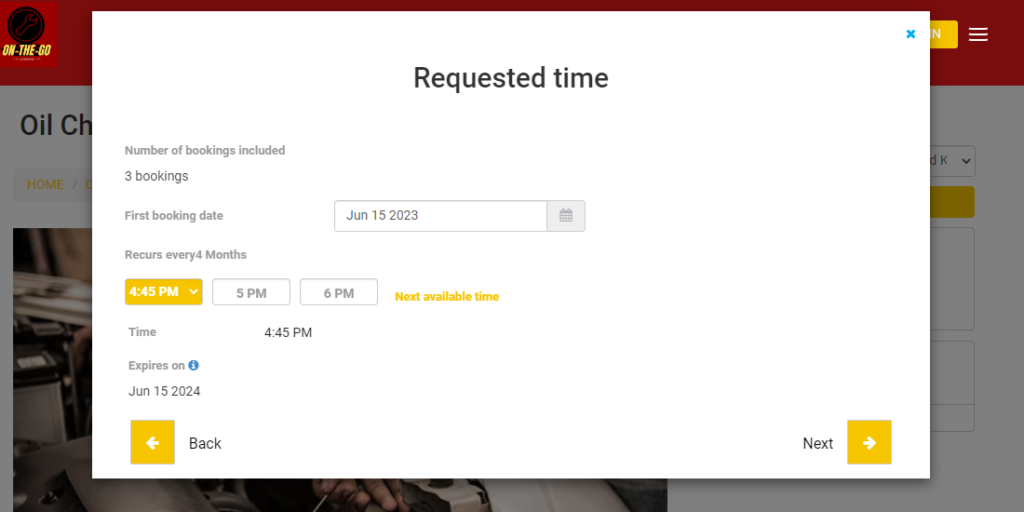
(Quantity refers to number of packages, not number of services inside.) - Pick First Date & Time
Select an available slot and press Next.
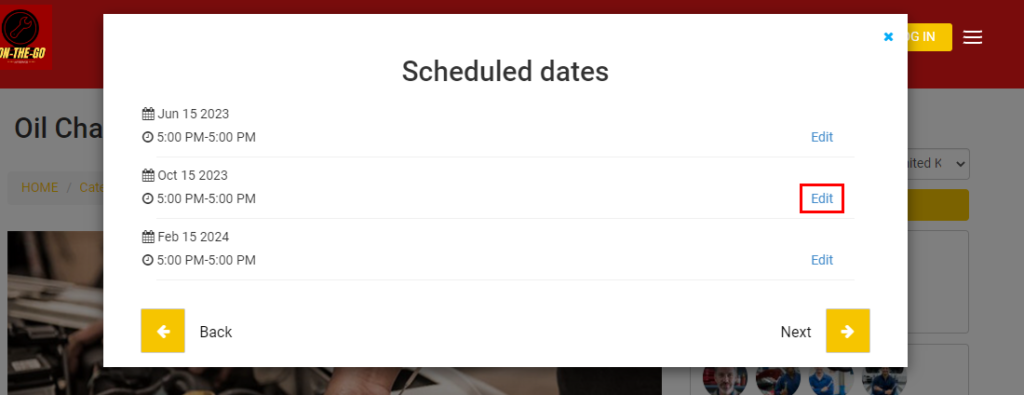
- Auto-Schedule Remaining Visits
OctopusPro lists the future appointments (e.g. 3-month intervals).- Click Edit next to any visit to change its date/time
- Press Next → confirm → pay.
B. Booking a Package Option within a Service
- Open the Service
Customer selects the base service (e.g. “Oil Change”).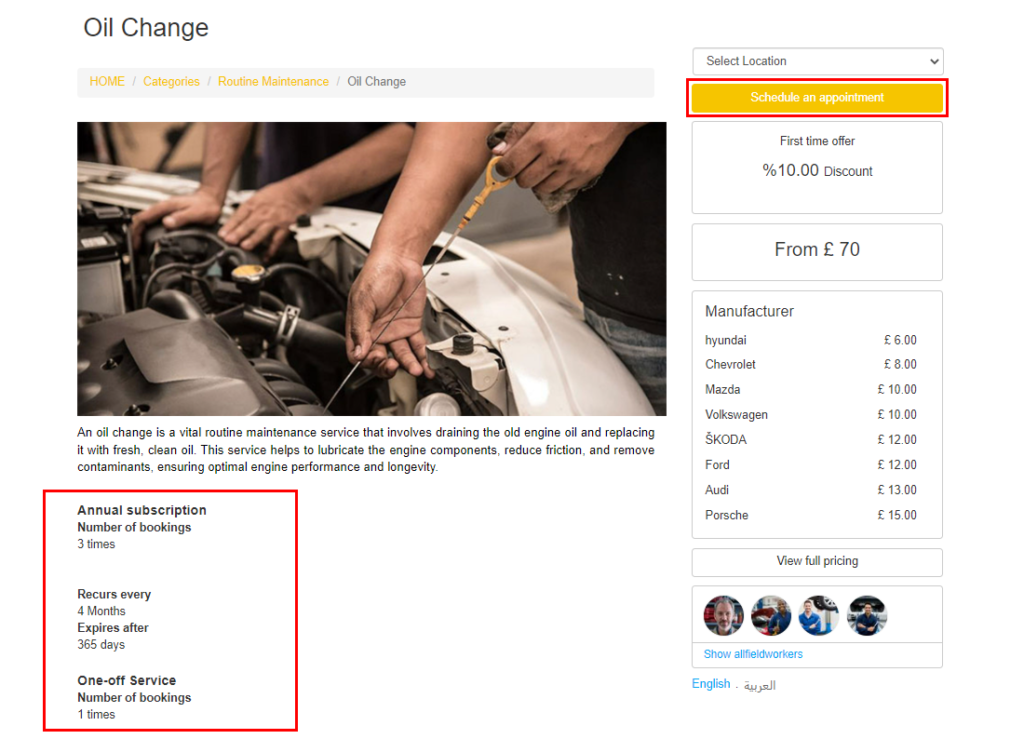
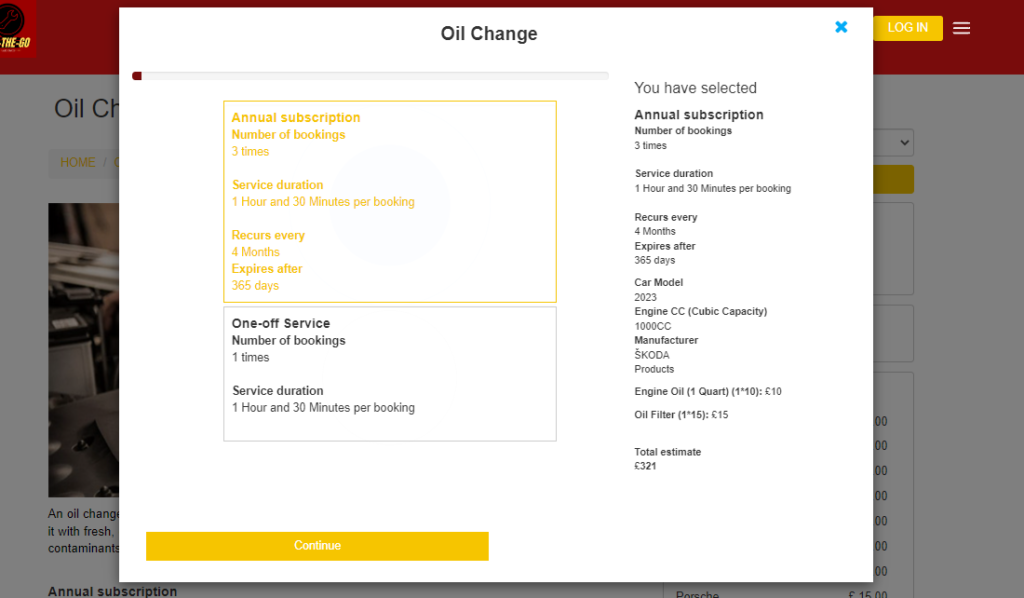
- Choose Package vs One-Off
In the options panel they see:Option What it includes Single Oil Change 1 booking, $75 3-Pack Oil Change 3 bookings, $60 each They pick the package they prefer.
- Complete Custom Fields (if any)
e.g. Vehicle type, oil grade, add-ons → Continue to Checkout. - Select Date & Time for the First Booking
The system pre-loads the remaining appointments based on the package’s recur rule. Customers can adjust each slot before confirming. - Finish & Pay
Review the summary showing total price, number of bookings, and schedule → Confirm Booking.
Customer Experience Highlights
- Full Transparency – package savings, remaining credits, and upcoming appointments are shown in the portal & emails.
- Flexible Rescheduling – customers (or staff) can move individual bookings within the pass validity period.
- One Payment, Multiple Visits – checkout captures the entire package value up-front (or per your payment settings). This locks in revenue and reduces no-shows.
Packages give clients an easy way to pre-plan routine services while your business secures repeat work with a single, streamlined checkout.

Popular Package Ideas by Industry
Service bundles let you pre-sell multiple sessions (or a mix of services) at a single, discounted price. Below are proven package concepts you can adapt, followed by a streamlined set-up checklist that works for any industry.
| Industry | High-performing package examples | Why it sells |
|---|---|---|
| Mobile Pet Care | 6-groom bundle (every 8 weeks) • 10 × 30-min dog-walk pass | Pets need regular care—owners lock-in a lower rate and you lock-in future revenue. |
| Home & Garden | “Season-Ready Lawn Plan” – 10 mows + 2 fertilise visits • Pool-care monthly plan (12 cleans) | Guarantees repeat work and keeps crews busy during low-demand weeks. |
| Mobile Mechanics / Fleet Service | Quarterly inspection & oil-change package (4 visits, prepaid) | Fleet managers prefer one PO rather than four separate jobs. |
| Tutoring & Training | 5 online maths lessons + bonus exam-revision session | Encourages bulk purchase; students commit to a learning block. |
| Beauty & Wellness | Bridal prep bundle: 3 hair trials, 2 facials, 1 wedding-day style | Combines different services that occur on a timeline, boosting average order value. |
One Checklist for Building Any Package
Whether you’re adding a brand-new “Standalone Package” or turning an existing service into a “Choose-a-Package” option, the wizard is identical after step 2.
- Open the Package wizard
Settings → Service Settings → Services
• Create New (for a standalone bundle) — or — Edit an existing service and click Add Package. - Basic details
Field Tips Package Name Customer-facing label, e.g. “6-Visit Grooming Pass”. # of Bookings How many appointments the bundle pre-pays. Recurrence (optional) Fixed interval (e.g. every 2 weeks) or leave blank so customer chooses. Expires After (optional) Days before unused sessions lapse. - Pricing & Invoicing
Cost & Payrate tab- Enter Unit Price (usually discounted vs. single booking).
- Pick an Invoicing Rule:
• All invoices now • One-by-one • Single lump-sum • None (manual).
- Field-worker pay rules (optional)
Configure hourly or commission rates just as you would for any service. - Custom fields & media
Add intake questions, photos, or explainer video. Save to publish.
That’s it—no duplicate steps per industry. The same five-step flow covers dog walks, lawn care, tutoring blocks, or bridal packages.
Why Packages Win for Everyone
For your business
- • Up-front cash-flow* – pre-payment boosts working capital.
- • Higher lifetime value* – customers who pre-buy tend to re-book and refer friends.
- • Predictable scheduling* – lock in recurring work, smooth seasonal dips.
For your customer
- • Convenience* – one checkout reserves multiple future sessions.
- • Savings* – bundle discount vs. piecemeal bookings.
- • Peace of mind* – no need to remember re-booking; reminders are automated.
 What About Package-Level Add-ons?
Need a package that changes price by option (e.g. “with premium wax”) or by location?
- Custom-field packages – create the add-on as a custom-field option and attach its own package or quantity limits.
- Geo-price packages – combine a package with Geo-Pricing to charge different bundle prices in different zones.
Use these patterns to tailor irresistible bundles that fit any field-service niche.
To stay updated, please subscribe to our YouTube channel.