
[vc_row][vc_column width=”1/4″][vc_widget_sidebar sidebar_id=”sidebar-1″][/vc_column][vc_column width=”3/4″][vc_column_text]
Field Service Management Software
Field service management software helps service businesses manage the complete job lifecycle, from lead capture and quoting to scheduling, dispatching, field execution, invoicing, payments, and reporting.
OctopusPro is built for businesses that deliver services at customer locations, across service areas, between multiple stops, or through hybrid workflows that combine mobile, storefront, and remote services. It is ideal for industries such as plumbing, HVAC, electrical, cleaning, pest control, inspections, mobile detailing, roadside assistance, towing, mobile mechanics, courier-style operations, and other service businesses that need to coordinate office staff, fieldworkers, customers, locations, and payments from one system.
If your business offers more than one service delivery model, start by setting up your service delivery types for mobile, storefront, and remote services.
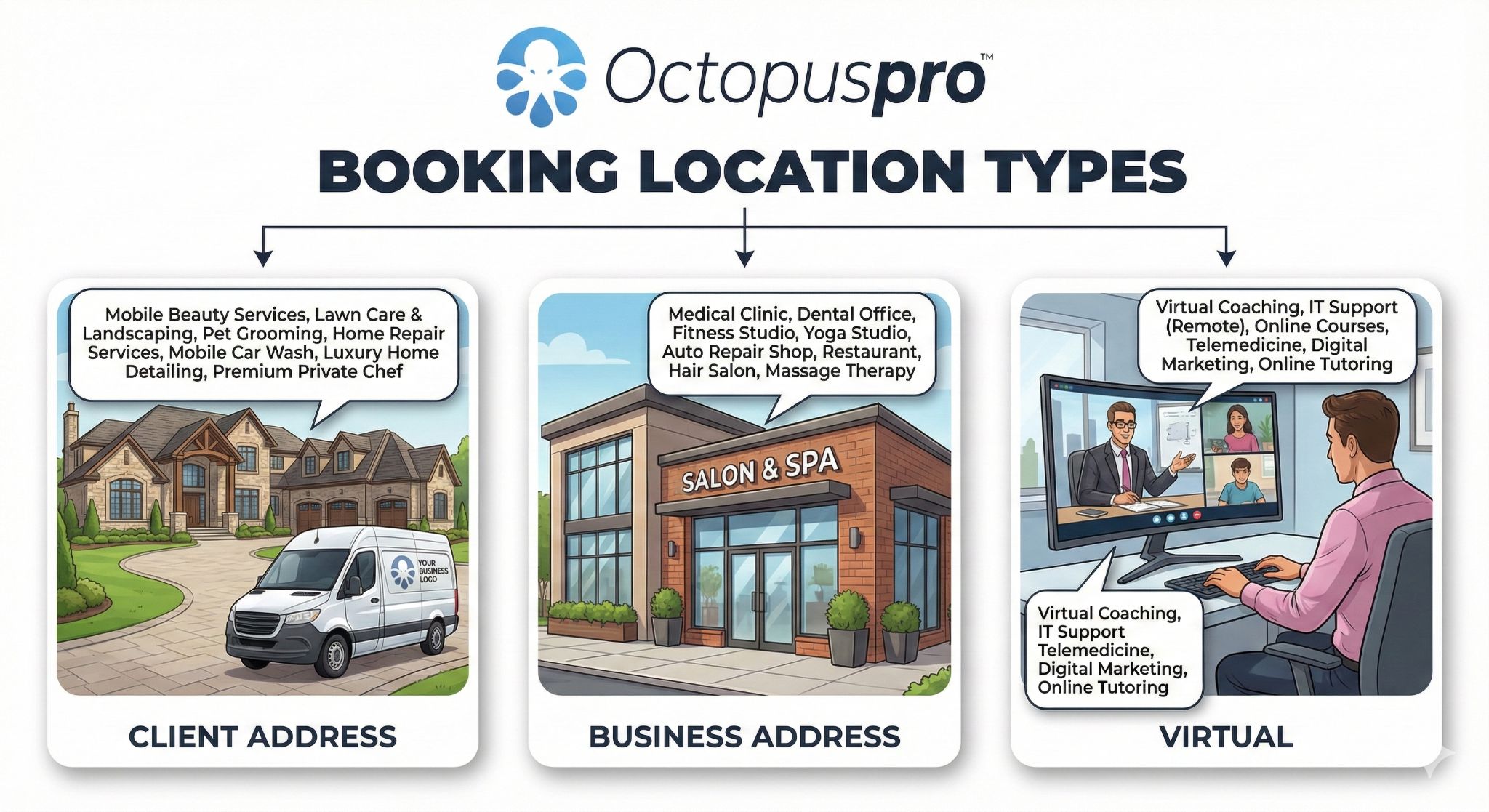
Table of contents
- What is field service management?
- Who is field service management software for?
- Benefits of field service management software
- Core field service management capabilities
- Roadside locations, multi-stop jobs, and exact GPS coordinates
- Google Maps URL and shared pin links for roadside jobs
- Recommended setup order in OctopusPro
- Lead capture, CRM, and booking conversion
- Scheduling and dispatch
- Fieldworker mobile workflows
- GPS tracking vs check-in and check-out tracking
- Online bookings and customer self-service
- Invoicing, payments, and reporting
- Common use cases
- Related guides
What is field service management?
Field service management (FSM) is the operational framework used to run jobs outside the office or workshop. It includes the tools and processes needed to manage service requests, customer communication, scheduling, dispatch, mobile execution, billing, and performance reporting.
In practical terms, a strong field service management system should help you:
- Capture new work requests and convert them into quotes or bookings
- Schedule jobs based on availability, service areas, and travel requirements
- Dispatch the right fieldworker, technician, driver, or crew to each job
- Manage standard bookings as well as multi-stop, pickup, drop-off, and roadside workflows
- Keep customers informed with confirmations, reminders, ETA updates, and job status notifications
- Support fieldworkers with job details, navigation, notes, forms, photos, and communication tools
- Generate invoices, collect payments, manage refunds, and monitor operational performance
Who is field service management software for?
Field service management software is suitable for any business that delivers services away from a fixed desk-based location, or that manages work requiring bookings, locations, teams, and customer communication.
Common examples include:
- Trades and home services
- Cleaning and property services
- Roadside assistance and towing
- Mobile mechanics and automotive services
- Inspection, testing, and compliance businesses
- Delivery, transport, and collection services
- Medical, wellness, pet care, and personal services delivered on-site
- Any business operating a mix of mobile, storefront, and remote services
Benefits of field service management software
- Faster scheduling and dispatch: Reduce manual coordination and assign work more efficiently.
- Better location accuracy: Manage service areas, travel constraints, exact job sites, and multi-address workflows with less confusion.
- Improved customer experience: Provide clearer communication, online booking options, and more reliable arrival expectations.
- Better field visibility: Give fieldworkers everything they need in one app, including job details, notes, alerts, and navigation.
- Cleaner operational records: Keep communications, photos, forms, billing, and history tied to the same customer and booking record.
- Faster billing and stronger cash flow: Move from completed work to invoicing and payment collection more efficiently.
- Better business insights: Track activity, revenue, completion rates, and operational performance in real time.

If you want the system to offer only valid bookable time slots based on real availability, use dynamic real-time fieldworker availability scheduling.
Core field service management capabilities
OctopusPro combines the main functions that service businesses typically need to manage their field operations from one platform:
- Lead and inquiry management: Capture new leads, follow up, and convert inquiries into quotes or bookings.
- Booking and job management: Create, update, track, and manage service jobs through one central workflow.
- Service setup and pricing: Configure services, pricing, packages, custom fields, and booking options.
- Scheduling and dispatch: Manage calendars, assign jobs, handle unassigned work, and coordinate teams.
- Fieldworker app workflows: Support mobile job execution with navigation, alerts, notes, status updates, forms, and photos.
- Customer portal and online booking: Let customers request or book services online based on your rules and availability.
- CRM and communication history: Keep customer records, activity, communication logs, and service history together.
- Invoicing and payments: Generate invoices, collect payments, track balances, and process refunds.
- Reporting and analytics: Monitor bookings, activity, performance, revenue, and field operations from live reports.

Learn more about service booking management, calendar scheduling and dispatch, and invoice, billing, payment, and refund management.

Roadside locations, multi-stop jobs, and exact GPS coordinates
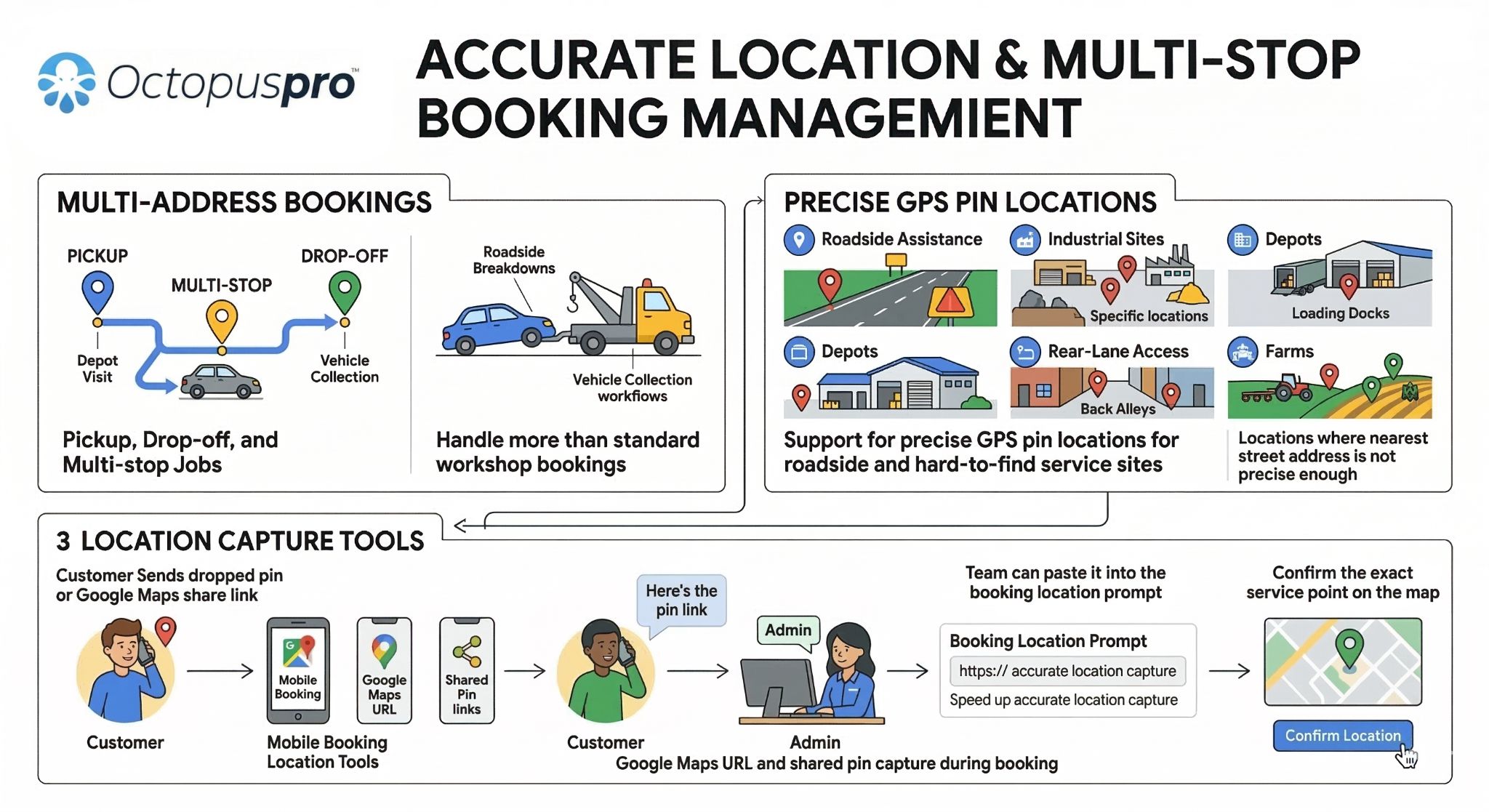
Not every service job happens at a simple front-door street address. Many businesses need to manage roadside call-outs, pickup and drop-off workflows, depot visits, temporary service points, rear-lane access, industrial sites, farms, warehouses, and other locations where a standard address is not accurate enough on its own.
OctopusPro supports these workflows through multi-address bookings for pickup, drop-off, and multi-stop jobs, together with location tools that help your team work with more precise service points.

This is especially useful for:
- Roadside assistance and towing companies
- Mobile mechanics and vehicle collection workflows
- Courier and last-mile delivery operations
- Skip-bin, waste, and disposal services
- Teams visiting depots, loading docks, factories, and large properties
- Any mobile service business where the real job site is different from the nearest postal address
Instead of creating separate records for each stop, you can keep the full service route inside one booking where appropriate. This improves dispatch clarity, helps fieldworkers follow the correct job sequence, and reduces confusion between office staff, field teams, and customers.
Google Maps URL and shared pin links for roadside jobs
For breakdowns and hard-to-find locations, customers often send a dropped pin or Google Maps share link instead of a precise street address. This is common for highways, parking structures, depots, rear entrances, industrial sites, farms, and other non-standard job locations.
When this happens, your office team can use the booking location tools to capture the most accurate service point available and confirm the exact site on the map. This helps reduce failed arrivals, repeated clarification calls, and location errors when the nearest street address is too broad or misleading.
This workflow is especially valuable for:
- Roadside breakdowns and emergency call-outs
- Battery, tyre, lockout, and recovery services
- Vehicle pickup and drop-off coordination
- Warehouse back-entry and loading dock access
- Large sites with multiple entrances or service points
To improve mapping accuracy, routing, geocoding, and place lookup, connect your Google Maps API integration.
Recommended setup order in OctopusPro
For most field service businesses, this is the best order to set up the system:
- Choose your service delivery types
Decide whether your services are mobile, storefront, remote, or a mix of all three.
Set up service delivery types - Create your services and pricing
Add what you sell, how you price it, what options are included, and what custom data you need to collect.
Create and configure a new service
- Set fieldworker service areas and locations
Define where each fieldworker can work so the system can support more accurate booking and dispatch decisions.
Configure fieldworker service areas
- Set working hours and availability
Configure company hours, fieldworker rosters, breaks, leave, and unavailable times.
Enable real-time availability scheduling
- Choose your dispatch method
Decide whether you want manual assignment, automated dispatch, or an unassigned queue workflow.
Configure job assignment and dispatch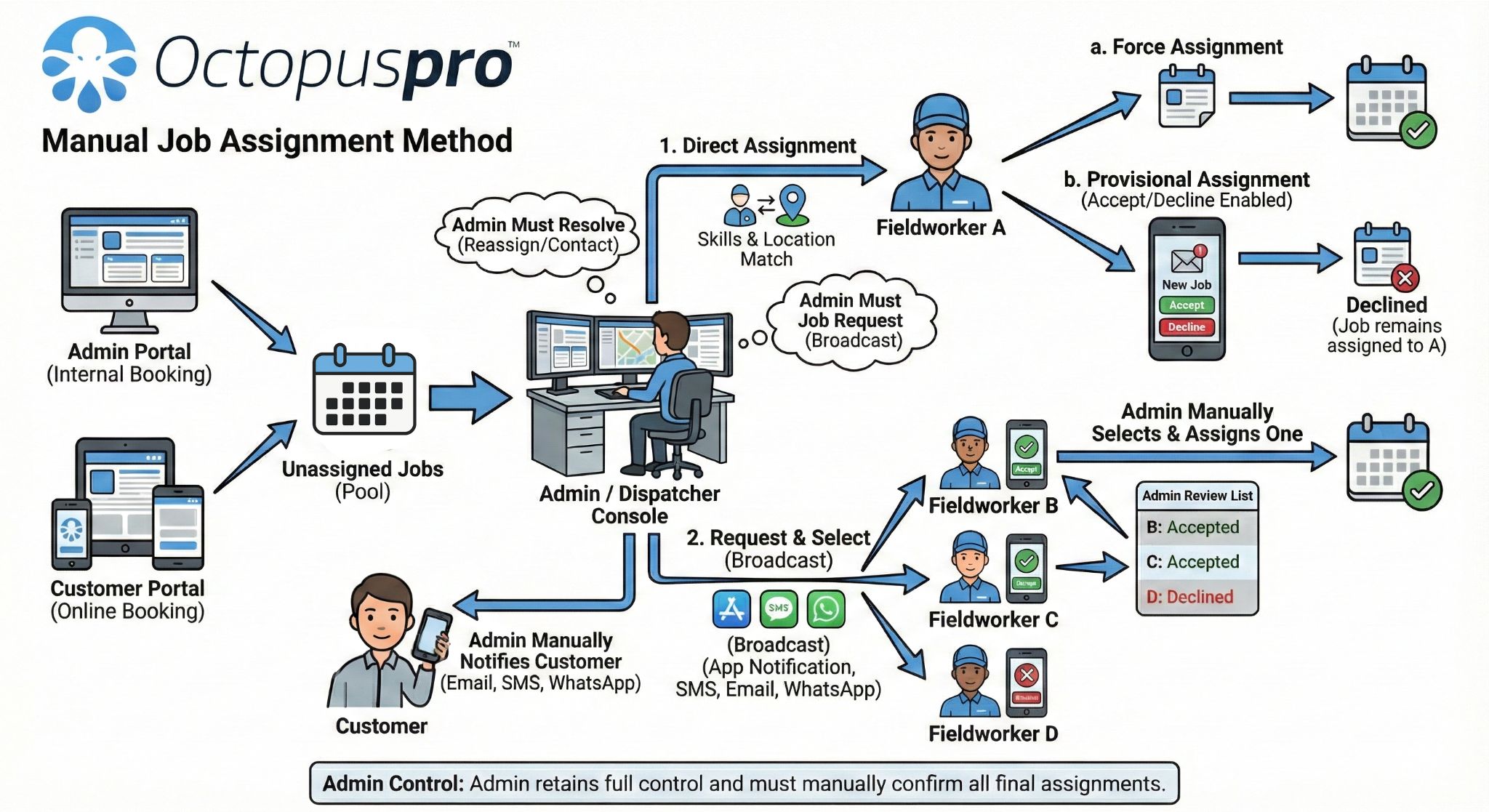
- Enable mapping and location tools
Connect Google Maps to support address accuracy, route calculations, and location-based workflows.
Set up Google Maps API integration - Connect calendars if needed
Sync fieldworker calendars to improve visibility and reduce double-booking risk.
Set up Google Calendar sync
- Enable customer self-service if needed
Turn on online booking, portal rules, and checkout payment options.
Set up the customer portal for online bookings | Configure customer portal payment methods - Build your field workflow
Add forms, checklists, notes, and proof-of-work requirements to standardise service delivery.
Set up forms and checklists
Lead capture, CRM, and booking conversion
Field service operations usually begin before a booking is created. Customers may first contact your business through a website form, phone call, email, referral, or customer portal inquiry. OctopusPro helps you capture these leads, store them as inquiry records, follow up, and convert them into quotes or bookings when ready.
This helps your team avoid losing opportunities and keeps early-stage communication linked to the same customer record and service history.
Useful related guides:
- Inquiries and lead management
- Customer management and CRM
- Create a new booking
- Booking management overview
Scheduling and dispatch
Scheduling and dispatch are at the core of every field service operation. OctopusPro supports different dispatch models depending on how much control your office team wants and how much automation your workflow needs.
Manual dispatch
Manual dispatch is ideal when bookings need human review, skill-based assignment, priority handling, or direct operational control.
Automated dispatch
Automated dispatch is useful when you want the system to assign or broadcast jobs based on service rules, availability, service areas, and scheduling logic.
Unassigned task workflows
If you prefer bookings to enter a queue first, use the Unassigned Tasks Manager. This is useful when jobs need triage, manual review, or staged assignment.

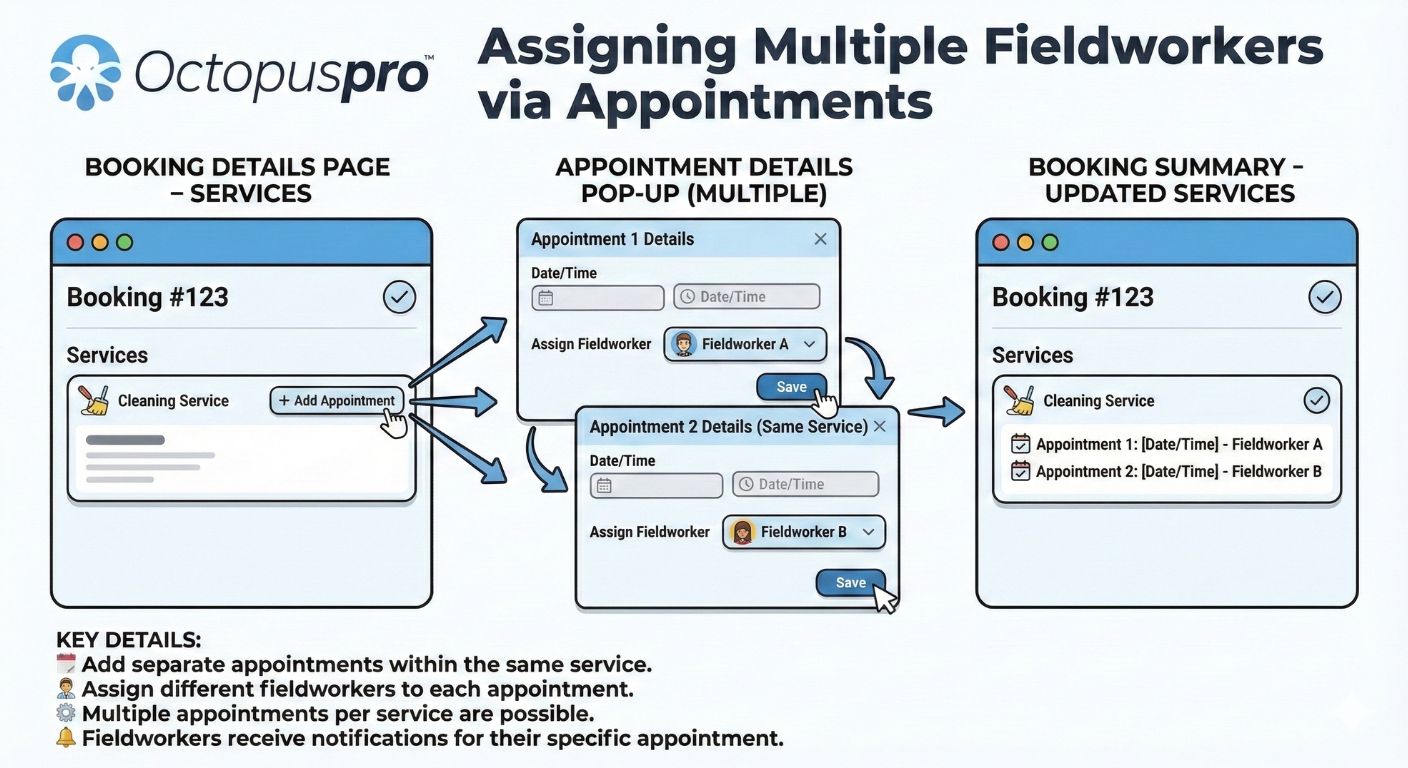
Multi-worker bookings
Some jobs require more than one fieldworker. OctopusPro also supports assigning multiple fieldworkers to one booking when a crew or team-based workflow is needed.
Fieldworker mobile workflows
The fieldworker app is where technicians, drivers, and on-site teams receive work, review booking details, navigate to job locations, update progress, capture notes, complete forms, and close out work in the field.
A typical fieldworker workflow includes:
- Receive or accept a new job request
- Review service details, customer details, notes, and location information
- Navigate to the site and send ETA or on-the-way updates
- Start, update, and progress the job through the app
- Capture notes, photos, signatures, forms, and service-specific job data
- Complete the work and trigger the next billing or follow-up step
Useful guides for this workflow:
- Managing new job requests and booking assignments
- Alarms, ETA alerts, and booking reminders
- Forms and checklists overview
- Notifications, discussions, call alerts, and SMS communication


GPS tracking vs check-in and check-out tracking
These two features are related, but they serve different purposes:
- Real-time GPS tracking shows where the fieldworker is during the workday and helps with live visibility, dispatch awareness, movement tracking, and job progress monitoring.
Learn about real-time fieldworker GPS tracking
- Check-in and check-out tracking records when a fieldworker starts and finishes a specific job, often including GPS-stamped job time logs for attendance, proof of arrival, and time-on-site tracking.
Learn about fieldworker check-in and check-out tracking
In short, GPS tracking is best for continuous visibility across the day, while check-in and check-out tracking is best for job-based proof of attendance and service timing.
Online bookings and customer self-service
If you want customers to request or book services online, OctopusPro includes a customer portal that can be linked from your website, booking buttons, landing pages, or direct booking links.
With the customer portal, you can:
- Accept online booking requests or direct bookings
- Display available services and booking options
- Control which payment methods appear during checkout
- Support mobile-service location capture and extra address fields where relevant
- Offer a smoother self-service experience while keeping your operational rules in place
Start here:
- Accept online bookings through your website
- Set up payment methods for customer portal checkout
- Use multi-address bookings for pickup, drop-off, and multi-stop jobs
Invoicing, payments, and reporting
Field service management does not end when a job is completed. OctopusPro also connects your field operations to billing, payments, and business reporting.
 Once work is complete, you can generate invoices, collect payments, monitor outstanding balances, manage refunds, and review operational performance without switching between disconnected systems.
Useful guides include:
- Invoice, billing, payment, and refund management
- Service booking management overview
- Calendar scheduling overview

Common use cases
- Roadside assistance: Capture exact breakdown locations, dispatch the right operator, and manage non-standard roadside job sites.
- Mobile mechanics: Handle diagnostics, repairs, vehicle pickup and return workflows, and mixed workshop/on-site operations.
- Towing and transport: Manage pickup, depot, and drop-off workflows inside one service process.
- Home services: Schedule plumbers, electricians, cleaners, and tradespeople based on territory, availability, and service type.
- Inspection and compliance businesses: Use forms, checklists, notes, and proof-of-service records to standardise field reporting.
- Courier and collection services: Manage multi-stop routes, collection jobs, and destination-based workflows more clearly.
Related guides
Setup and configuration
- Service delivery types: mobile, storefront, and remote
- Create and configure a new service
- Fieldworker service areas and operational locations
- Dynamic real-time fieldworker availability scheduling
- Google Maps API integration
- Google Calendar sync
Lead, CRM, and booking workflows
- Inquiries and lead management
- Customer management and CRM
- Service booking management overview
- Create a new booking
- Multi-address bookings for pickup, drop-off, and multi-stop jobs
Scheduling and dispatch
- Job assignment and dispatch methods
- Unassigned Tasks Manager
- Assign multiple fieldworkers to a booking
- Calendar scheduling and dispatch overview
Fieldworker operations
- Managing new job requests and assignments
- Alarms, ETA alerts, and booking reminders
- Real-time fieldworker GPS tracking
- Fieldworker check-in and check-out tracking
- Forms and checklists overview
- Notifications, internal discussions, call alerts, and SMS
Customer portal, billing, and payments
- Accept online bookings through your website
- Customer portal payment methods
- Invoice, billing, payment, and refund management
To stay updated, please subscribe to our YouTube channel.
[/vc_column_text][/vc_column][/vc_row]