
[vc_row][vc_row][vc_column width=”1/4″][vc_widget_sidebar sidebar_id=”sidebar-1″][/vc_column][vc_column width=”3/4″][vc_column_text]
Allow Fieldworkers to Add Subworkers (Crew Members)

The Subworkers feature lets a lead fieldworker add assistants, apprentices, or crew members under their team—while keeping each person’s login, timesheet, GPS activity, and compliance documents tracked separately. This makes crew-based job delivery easier to manage, improves visibility for admins, and helps maintain secure, role-based access control (RBAC).
Overview
Subworkers are designed for businesses that run jobs using crews (e.g., lead + assistant, multi-tech teams, apprenticeships). Admins can turn the feature on using a single company-wide permission, and then lead fieldworkers (if permitted) can add their own crew members from their account.
What is a Subworker?
A subworker is a lightweight user record nested one level below a lead fieldworker:
- Has their own login to the web portal and mobile app, but typically inherits the lead’s service areas, skills, and customer list.
- Can clock in/out, upload job photos, and appear on live GPS maps to support real-time ETA and tracking workflows.
- Cannot view invoices, prices, or complaints by default—helping protect customer PII and financial data.
- May be hired/paid by the lead fieldworker, while still remaining visible to admins for scheduling and compliance.
Hierarchy limit: Subworkers cannot create additional subworkers. OctopusPro supports a single parent-child level to keep reporting and permissions simple.

Key Benefits
- Crew scheduling: Coordinate multiple people on a single job with clearer accountability and staffing visibility.
- Least-privilege access: Subworkers focus on job execution while sensitive information (pricing/invoices/complaints) stays restricted.
- Cleaner payroll data: Timesheets and pay rates can be tracked per person instead of sharing one account.
- Predictable licensing: Subworkers follow the same user-seat/licensing approach as fieldworkers, with bundled options on certain plans.
- Crew-wide communications: Support broadcast-style notifications to the team (SMS/email) when required.
Pricing & Licensing
Subworkers are licensed as user seats in OctopusPro:
| Plan Type | Charge Method | Effect |
|---|---|---|
| Standard / Growth | Each subworker = 1 fieldworker seat | Costs scale 1-for-1 with headcount |
| Unlimited / Corporate | User fees bundled | Add subworkers without per-user billing increases (booking-based pricing) |
Cost & billing: Subworkers count as full fieldworker licences and are billed at the same user-fee rate as a standard fieldworker (unless you’re on a plan where user fees are bundled).
How to Enable Subworkers
Admins can enable subworkers using one global permission (applies across your account).
- Sign in as an Admin.
- Go to Settings → General Settings → Fieldworker Permissions.
- Enable the toggle: Allow fieldworkers to create subworkers.
- Save your changes.
What changes when enabled? An Employees (Subworkers) tab becomes available inside each fieldworker profile. Admins (and permitted lead fieldworkers) can add assistants/apprentices/crew as subworkers—each with their own login, schedule, and timesheet.
Onboarding Workflow (Admins & Lead Fieldworkers)
Admins (Web Portal)
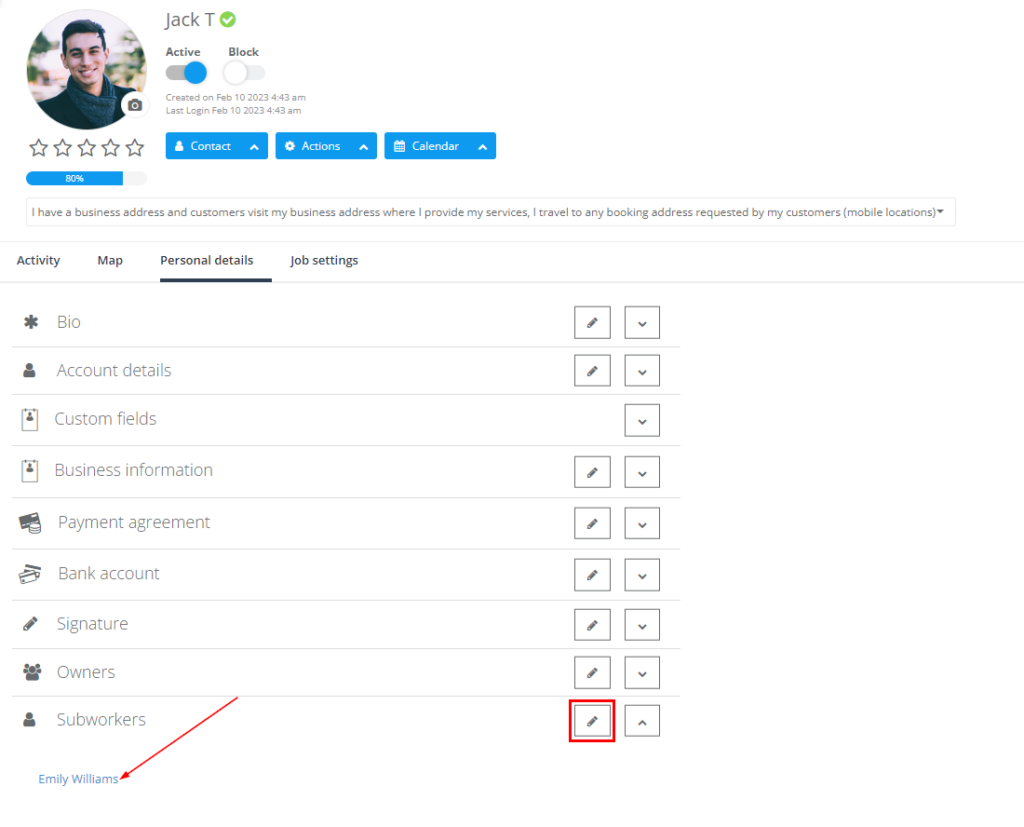
- Go to Fieldworkers → open the lead fieldworker profile.
- Open Personal Details → click + Create New Subworker.
- Complete the form (commonly includes: name, email, mobile, pay rate, credentials, licences).
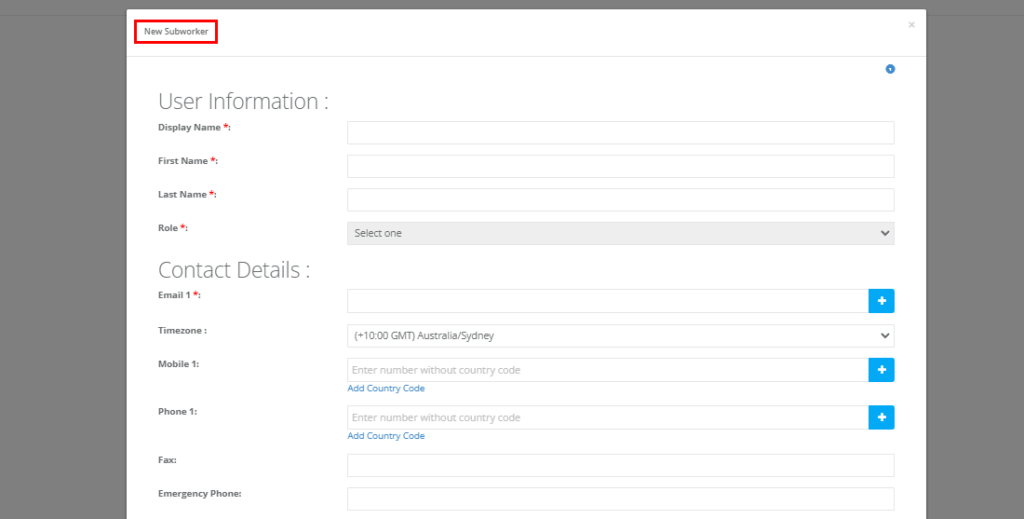
- Click Save — an invite email is automatically sent to the subworker with a login link.
Lead Fieldworkers (If Permitted)
- Go to My Account → Subworkers → Add.
- Complete the form → click Save.
Bulk Import (Fast Setup)
If you’re onboarding many subworkers at once, you can bulk-create them via CSV import:
- Go to User Management → Import
- Upload a CSV that includes a lead ID column to link each subworker to the correct lead fieldworker
Permissions (Default Matrix)
Subworkers are designed around RBAC and least-privilege access. The default behaviour is:
| Action | Admin | Lead Fieldworker | Subworker |
|---|---|---|---|
| View own jobs | ✓ | ✓ | ✓ |
| View all jobs | ✓ | ✕ | ✕ |
| Create bookings | ✓ | Optional* | ✕ |
| View invoices | ✓ | Optional* | ✕ |
| Edit customer PII | ✓ | ✕ | ✕ |
| Clock in/out | ✕ | ✓ | ✓ |
*Admins can grant additional rights per lead fieldworker using Fieldworker Permissions.
Payroll & Timesheets
- Subworkers can log hourly, per-task, or commission-based rates (based on your setup).
- GPS-verified check-in/out can populate timesheets to support more accurate payroll processing.
- Export payroll data to Xero, QuickBooks, or CSV for bulk pay runs.
Compliance & Safety
- Attach and manage licences, certifications, or police checks per subworker.
- Use expiry reminders to stay ahead of compliance requirements.
- Maintain accountability with an audit trail that logs edits, activation, and deactivation actions (as configured in your system).
Bulk Management Tips
| Task | Where | Why it helps |
|---|---|---|
| Deactivate seasonal crew | Fieldworkers list → Status | Keeps history while removing them from active dispatch |
| Reassign a crew | Booking → Assignee | Move a job to a new lead while keeping staffing aligned |
| Filter by role | Calendar → Tag/Role filters | Quickly find “apprentice”, “assistant”, “nurse”, etc. by profile role/tag |
KPIs & Reporting
When subworkers are tracked as separate user profiles, reporting becomes far more actionable. Common metrics include:
- Labour cost per booking (lead vs. subworkers)
- Utilisation rate (scheduled hours vs. available hours)
- Customer rating variance between leads and their crews (useful for training and QA)
Mobile App Features for Subworkers
| Feature | Android / iOS |
|---|---|
| GPS navigation & live ETA | ✓ |
| Check-in/out (including geofence workflows, if enabled) | ✓ |
| Upload before/after photos | ✓ |
| Push notifications for new tasks | ✓ |
Important: Subworkers must allow location services on first login to support ETA and safety-related alerts.
Known Limitations
- Single-level hierarchy: Subworkers cannot create their own subworkers.
- No direct customer messaging (by default): Messaging funnels through the lead fieldworker or office to avoid mixed communication.
- Inventory/stock controls: Subworkers inherit the lead’s inventory permissions and typically cannot issue purchase orders independently.
Related Guides
- Managing Subworkers Working Under Your Fieldworkers
- Manage Fieldworkers, Sub-workers & Payroll
- Fieldworker Permissions & Access Control

To stay updated, please subscribe to our Youtube channel.
[/vc_column_text][/vc_column][/vc_row]